Multimodal Data Flow
A TuyaOpen AI device is multimodal: it takes in speech, text, camera images, and device/sensor data, and responds with speech, on-screen text, and actions. This page categorizes those four modalities and shows how each one travels between the hardware (mic, speaker, camera, display, sensors), the on-device software (ai_components), and the Tuya AI cloud.
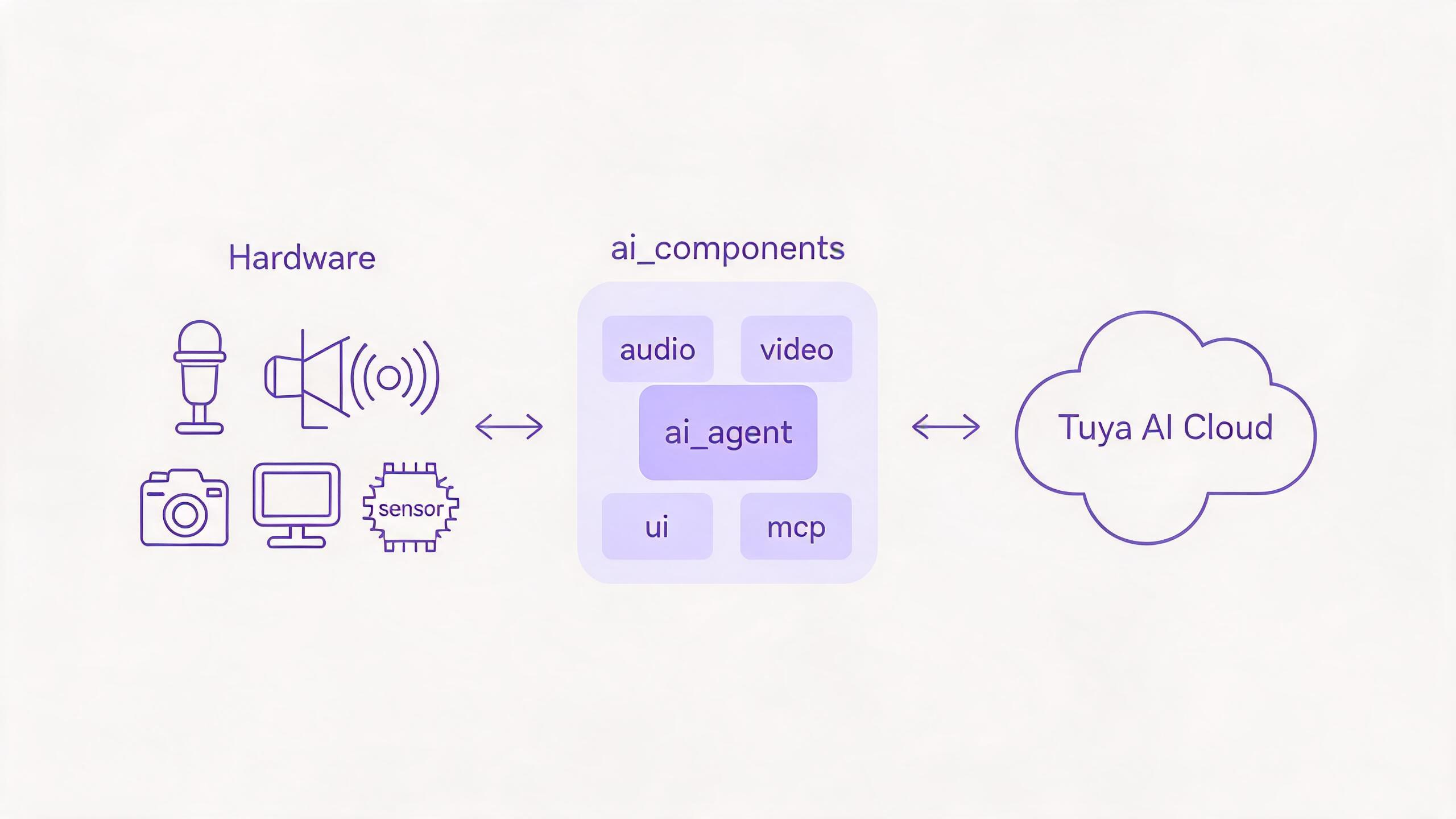
The three-layer path
Every modality follows the same path, and ai_agent is the single bridge to the cloud. Each modality module owns one class of peripheral and hands its data to — or receives it from — the agent.
You enable only the modalities your product needs in Kconfig (ENABLE_COMP_AI_*); disabled modules are not compiled in.
1. Audio — voice in, voice out
The core modality for a voice assistant.
- In: microphone →
ai_audio_input→ Voice Activity Detection (VAD) — manual (a button press) or automatic (voice detection) — slices the speech, whichai_agentuploads to cloud ASR. Wake-word listening is driven by the Wakeup chat mode. - Out: cloud TTS and music →
ai_audio_player→ decode and resample → speaker. - Hardware: microphone, speaker, and a button for press-to-talk.
- Components: Audio input, Audio player.
2. Vision — images in, preview out
- In: camera →
ai_video_inputcaptures a JPEG frame (ai_video_get_jpeg_frame) →ai_agent_send_imageuploads it to cloud vision for visual Q&A or image understanding. - Out / preview: live camera frames render locally through the video display callback; cloud-pushed images stream in through
ai_picture. - Hardware: camera, display.
- Components: Video input.
3. Text — typed or recognized in, rendered out
- In:
ai_agent_send_textsends a string directly; spoken input also comes back as ASR text. - Out: the NLG reply streams back token by token, and
ai_uirenders it in your chosen style (WeChat-style bubbles, chatbot, or OLED). - Hardware: display (and serial, for the serial chatbot demo).
- Components: AI Agent, UI management.
4. Sensory / device data — state in, actions out
This is how the cloud AI perceives and controls the physical device.
- The AI reads device state and triggers actions through MCP tools exposed by
ai_mcp: query device information, switch chat mode, take a photo, adjust volume — plus any custom tool you register for your own sensors and actuators. - Arbitrary byte payloads can also be uploaded with
ai_agent_send_file. - Hardware: sensors, actuators, GPIO — reached through your MCP tool implementations.
- Components: MCP server, MCP tools.
Where each modality is handled
| Modality | In (hardware → cloud) | Out (cloud → hardware) | Components |
|---|---|---|---|
| Audio | mic → VAD → agent | TTS / music → player → speaker | ai_audio_input, ai_audio_player |
| Vision | camera → JPEG → agent | preview / pushed image → display | ai_video_input, ai_picture |
| Text | send_text / ASR | NLG stream → UI → display | ai_agent, ai_ui |
| Sensory / device | MCP tool reads, send_file | MCP tool actions | ai_mcp |
All four modalities share one cloud session through ai_agent. The chat modes decide when the device listens and uploads; the agent decides how data reaches the cloud; the cloud decides what comes back.
See also
- Component Framework — the modules behind each modality
- AI Agent — the single bridge to the cloud
- Voice Chat Modes — when the device listens
- Expose MCP on the device — sensory input and device control