CLI - tos.py Development Tool
Overview
tos.py is the command-line interface (CLI) development tool for TuyaOpen, used for project configuration, compilation, firmware flashing, and debugging.
This page introduces the working principle and usage methods of tos.py, explains the behavior of various subcommands, and provides answers and solutions for common problems.
After completing the activation of TuyaOpen, you can also view help information using the command tos.py --help
❯ tos.py --help
Usage: tos.py [OPTIONS] COMMAND [ARGS]...

  Tuya Uart Tool.

Options:
  -d, --debug  Show debug message
  -h, --help   Show this message and exit.

Commands:
  version  Show version.
  check    Check the dependent tools.
  config   Configuration file operation.
  build    Build the project.
  clean    Clean the project.
  flash    Flash the firmware.
  monitor  Display the device log.
  update   Update TuyaOpen dependencies.
  new      Create project or platform templates.
  dev      Development utilities (for example build-all-config).
  idf      Run idf.py passthrough (ESP32 only).
Using the command flag -d or --debug, you can display more execution logs
❯ tos.py -d version
[DEBUG]: open_logger init done.
[INFO]: Running tos.py ...
[INFO]: v1.3.0-23-g6bcb5aa
version
The version number information output by tos.py version is as follows
❯ tos.py version
[INFO]: Running tos.py ...
[INFO]: v1.3.0-23-g6bcb5aa
The displayed content is the current tag-commit of the TuyaOpen repository, consistent with the output of git describe --tags, where:
v1.3.0— the most recent release version number.23— there are 23 new commits on top of v1.3.0.g6bcb5aa—gis a fixed prefix, and6bcb5aais the abbreviated hash of the current commit.
If [Unknown version] appears, the current repository has no tags. This is common in forked repositories.
check
❯ tos.py check
[INFO]: Running tos.py ...
[INFO]: [git] (2.43.0 >= 2.0.0) is ok.
[INFO]: [cmake] (4.0.2 >= 3.28.0) is ok.
[INFO]: [make] (4.3 >= 3.0.0) is ok.
[INFO]: [ninja] (1.11.1 >= 1.6.0) is ok.
[INFO]: Downloading submoudules ...
[INFO]: [do subprocess]: cd /home/huatuo/work/open/TuyaOpen && git submodule update --init
[INFO]: Download submoudules successfully.
The check command completes two steps:
- Check whether the environment tools required by
TuyaOpenexist and validate their version numbers. - Download the required
submodules.
If an [Error] appears during the check:
- A tool is not installed or its version is too low. Install or upgrade the corresponding tool.
submodulesdownload fails. Rungit submodule update --initin theTuyaOpenroot directory.
config
❯ tos.py config -h
Usage: tos.py config [OPTIONS] COMMAND [ARGS]...

  Configuration file operation.

Commands:
  choice  Choice config file.
  menu    Menuconfig.
  save    Save minimal config.
config choice
In the project directory, execute the command tos.py config choice
It will display all the solidified configurations supported by the current project, which can be used directly
The selected configuration will be synchronized to the app_default.config file in the project path
❯ tos.py config choice
[INFO]: Fullclean success.
--------------------
1. DNESP32S3_BOX.config
2. XINGZHI_Cube_0_96OLED_WIFI.config
3. WAVESHARE_ESP32S3_TOUCH_AMOLED_1_8.config
4. ESP32S3_BREAD_COMPACT_WIFI.config
5. TUYA_T5AI_EVB.config
6. DNESP32S3.config
7. TUYA_T5AI_BOARD_EYES.config
8. TUYA_T5AI_MINI_LCD_1.3.config
9. T5AI_MOJI_1.28.config
10. TUYA_T5AI_BOARD_LCD_3.5.config
--------------------
Input "q" to exit.
Choice config file:
There are two sources for solidified configurations:
- Configuration files in the
configdirectory under the project path (such asyour_chat_bot) take priority. - If the first source does not exist, the configuration files provided in
TuyaOpen/boards(such asswitch_demo) are used.
This operation may change the toolchain being used, so the config operation will first perform a deep clean
When the config directory exists, it will not display configuration files in boards
If you only want to display configurations in boards, you can add the command flag config -d
config menu
The menu command will open a visual configuration interface
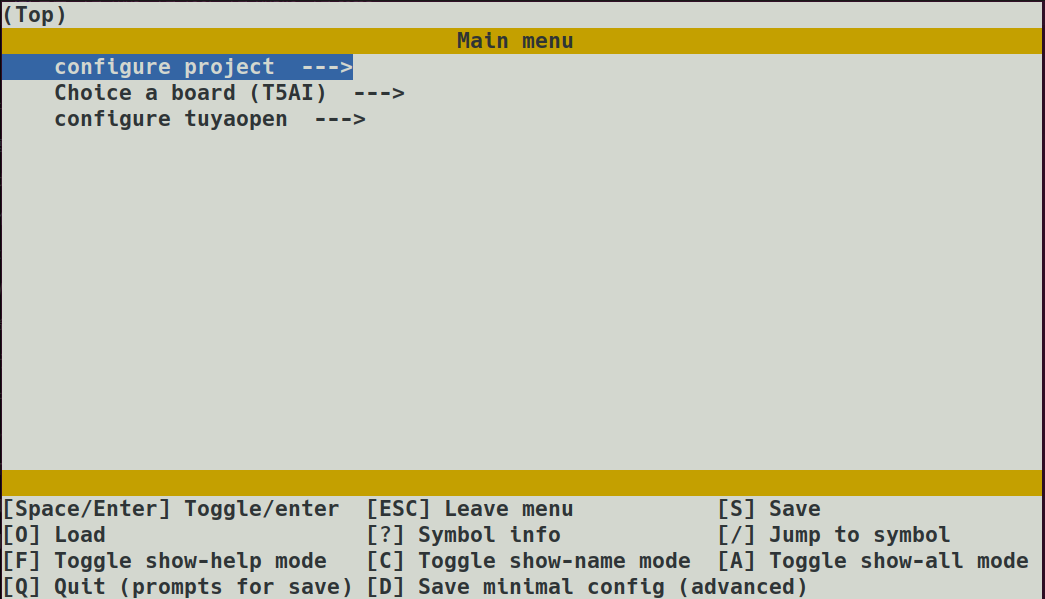
Users can modify configuration options according to project requirements, and after saving, it will synchronously modify the app_default.config file
This operation may change the toolchain being used, so the menu operation will first perform a deep clean
Modifying configurations may cause project functionality to change or even compilation to fail. You can ask technical support
Or use the choice command to reselect configurations
config save
save will save the configuration currently used by the project as a solidified configuration for future use
The specific operation is to rename the app_default.config file and save it to the config directory
❯ tos.py config save
[INFO]: Running tos.py ...
Input save config name:
The save operation is used for scenarios where solidified configurations have been modified through menu
build
Compile the project and generate executable files
❯ tos.py build
...
[INFO]: ******************************
[INFO]: /xxx/TuyaOpen/apps/tuya_cloud/switch_demo/.build/bin/switch_demo_QIO_1.0.0.bin
[INFO]: ******************************
[INFO]: ******* Build Success ********
[INFO]: ******************************
The build completes the following steps:
- Download the toolchain repository selected by the project to the
platformdirectory. - Execute the
prepareoperation of the toolchain. - Create the compilation directory
.buildand parse theCMakeLists.txtfile. - Execute the compilation command
ninja example. - Place the artifacts in
.build/bin.
If you want to see more detailed compilation logs, you can use the command flag build -v
clean
Clean compilation cache
Using the command flag clean -f, deep clean, will delete the compilation directory .build after ninja clean ends
flash
Flash executable files to the device
Use the tool tyutool_cli to complete flashing, if not available it will be downloaded automatically
According to project configuration, automatically adjust flashing methods, or manually set through command flags
❯ tos.py flash -h
Usage: tos.py flash [OPTIONS]

  Flash the firmware.

Options:
  -d, --debug         Show flash debug message.
  -p, --port TEXT     Target port.
  -b, --baud INTEGER  Uart baud rate.
  -h, --help          Show this message and exit.
The tyutool_cli tool is stored in the directory TuyaOpen/tools/tyutool
For Linux / Mac users, you need to enable serial port usage permissions, execute command
sudo usermod -aG dialout $USER
and restart the system
monitor
Use the tool tyutool_cli to display serial port logs
According to project configuration, automatically adjust log parameters, or manually set through command flags
❯ tos.py monitor -h
Usage: tos.py monitor [OPTIONS]

  Display the device log.

Options:
  -p, --port TEXT     Target port.
  -b, --baud INTEGER  Uart baud rate.
  -h, --help          Show this message and exit.
At the same time, you can also use the monitor function to write authorization codes, refer to: Equipment Authorization
Exit log viewing by pressing Ctrl+c, then press Enter
^C[INFO]: Press "Entry" ...

[INFO]: Monitor exit.
update
According to the dependency configuration file of TuyaOpen, switch related dependencies to the specified commit
If you use git pull or git checkout to update the TuyaOpen main repository, you can use the update command to automatically update related dependencies
Toolchain dependency relationships are recorded in the file TuyaOpen/platform/platform_config.yaml
idf
Runs arbitrary ESP-IDF idf.py commands against the ESP32 platform checkout. Only available when the project app_default.config selects ESP32 as the platform.
tos.py idf --help
Examples:
tos.py idf menuconfig
tos.py idf fullclean
tos.py idf --idf-flags="-v" build
Use --idf-flags for extra flags that must appear before the subcommand (for example verbosity or CMake defines). For a full command reference and workflow, see tos.py idf reference and ESP32 quick start.
dev
Development helpers. The main subcommand today is bac (build all config): iterate every .config in the app config/ directory (or board configs if the app has no config/), run a full clean between builds, and optionally copy binaries to a distribution folder.
tos.py dev --help
tos.py dev bac --help
Options for bac:
-d/--dist— directory where renamed firmware binaries are copied after each successful build.-o/--log-dir— write per-config build logs into this directory.
new
new project
This command quickly creates a new user application project.
Execution process:
- Ask for project name: prompts you to enter the name of the new project (for example,
my_app). - Select framework: choose a project template through the
--frameworkparameter. It currently supportsbase(basic template) andarduino. The default isbase. - Copy template:
- Find the corresponding framework template from the
tools/app_template/directory. - Copy the entire template directory to the current directory and rename it to the project name you entered.
- Find the corresponding framework template from the
new platform
For the specific usage of this command, please refer to new platform
Common Issues
Arrow keys fail when running config menu on Windows
This is caused by terminal emulator compatibility. Try the following:
- Select an available terminal in
cmdorpowershell. - Use the keys
h(left),j(down),k(up), andl(right) to navigate.
check errors
- Dependent tools are not installed or the version is too low. Install or upgrade the corresponding tools.
submodulesdownload fails. Rungit submodule update --initin theTuyaOpenroot directory.
could not lock config file
If the following error occurs
[WARNING]: Set repo mirro error: Cmd('git') failed due to: exit code(255)
  cmdline: git config --global --unset url.https://gitee.com/tuya-open/FlashDB.insteadOf
  stderr: 'error: could not lock config file /home/huatuo/.gitconfig: File exists'
[WARNING]: Set repo mirro error: Cmd('git') failed due to: exit code(255)
  cmdline: git config --global --unset url.https://gitee.com/tuya-open/littlefs.insteadOf
  stderr: 'error: could not lock config file /home/huatuo/.gitconfig: File exists'
You can manually delete the file ~/.gitconfig.lock