Concepts
Before clicking any buttons, take a few minutes to read this glossary — it will make every later page make sense. This page covers concepts only, not specific operations.
tyutool talks to a device over a serial link: commands from tyutool on your computer travel through a USB-to-serial adapter as UART electrical signals to the SoC on the device, which ultimately reads and writes the flash chip. The diagram below shows the full topology of this link.
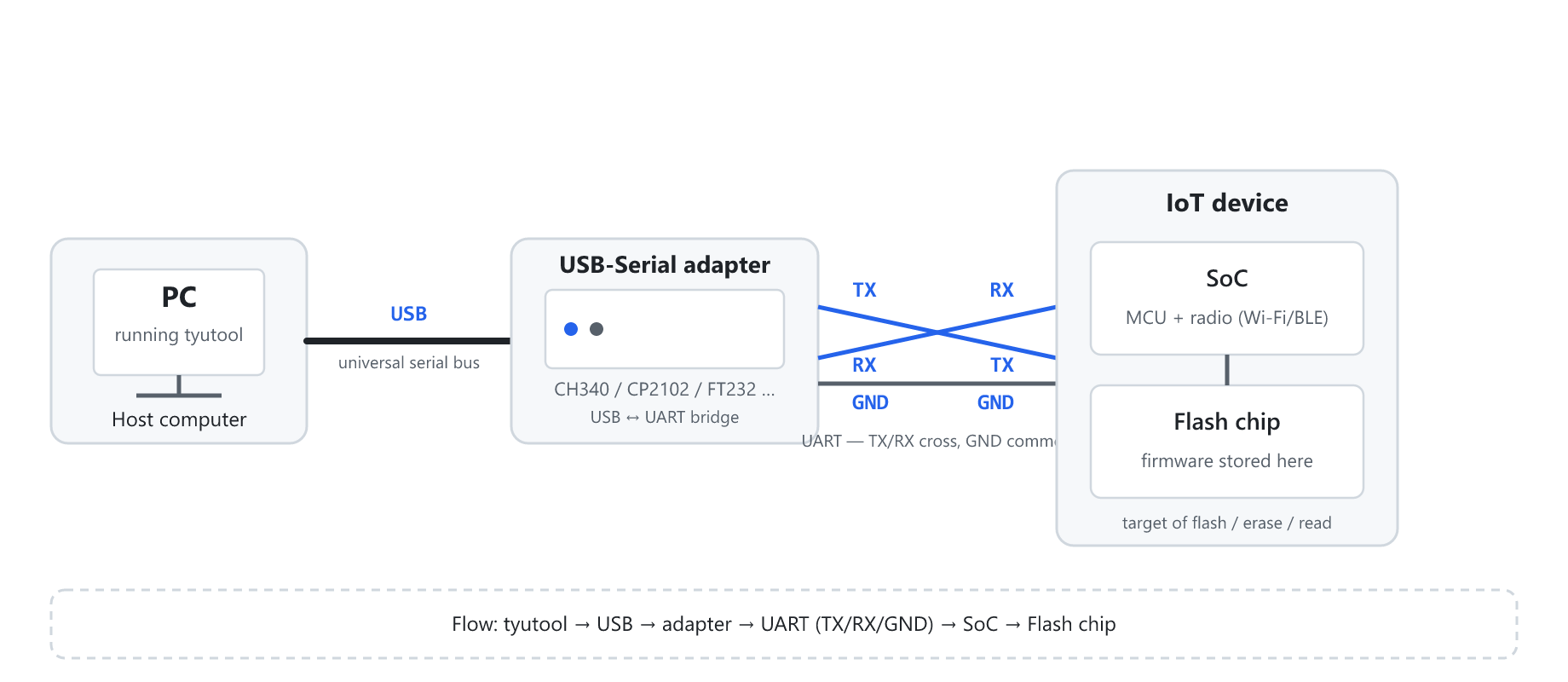
Figure 1 — Topology of the flashing link from tyutool to the device: tyutool → USB → adapter → UART (TX/RX/GND) → SoC → Flash chip.
New to firmware flashing? Read the first six sections in order; sections 7 and 8 work as a quick terminology reference.
What is firmware
Firmware is the program stored in a device's flash chip. You flash firmware to upgrade the device (add features), repair it (fix a bug), or customize it (load your own build). Firmware is, at its core, a block of byte data.
What is flashing
Flashing (also called "burning" or "writing") is the action of writing firmware bytes into a device's flash chip. The link carries the data like this: ① tyutool reads the firmware and chops it into blocks → ② the blocks go over USB to the adapter, which converts them to UART → ③ the UART lines (TX/RX/GND) reach the SoC, which writes the flash.
Flashing is an overwriting write. Back up important data by reading it first.
Erase
Erase clears certain regions of the flash to 0xFF. Typical uses: clearing a region before writing, or erasing the whole chip. Erase presets:
| Preset | Meaning |
|---|---|
authInfo | Erase only the authorization-info region (UUID/AuthKey), keeping firmware and other data |
fullChipNoRf | Erase the whole chip but keep the RF calibration (RF cal) region |
fullChip | Erase the entire chip completely (including RF calibration) |
fullChipNoRf is the most-used "safe thorough erase."
Read
Read is the inverse of flashing: it reads bytes out of the flash chip, used for backup (whole-chip read or read by segment).
Authorize
Authorize (TuyaOpen UART auth) writes a UUID + AuthKey so the device can connect to the Tuya cloud. Authorization and firmware are two independent things.
The UUID and AuthKey are credentials you purchase from Tuya. Writing forged or duplicate credentials pollutes the device pool.
Authorization has two operations: authorization read (auth-read) and authorization write (auth-write).
Serial / UART / baud rate
Serial communication, the USB-to-serial adapter (CH340/CP2102/FT232), the three UART lines (TX/RX/GND, wired crossed), and the baud rate:
| Baud rate | Typical use |
|---|---|
115200 | The most universal, most stable default rate |
460800 | Faster, still reasonably stable |
921600 | High-speed; needs the chip and cabling to support it |
Starting at 115200 is the safest bet.
Chip models
The chip model decides the communication protocol, baud rate, and flash capacity. For the full list see Firmware Flash and the command line.
tyutool terminology
| Term | Meaning |
|---|---|
| Flash | Write firmware into the flash chip |
| Erase | Clear flash regions to 0xFF |
| Read | Read bytes out of the flash chip |
| Authorize | Write UUID/AuthKey credentials |
| UUID | A unique device identifier (credential) |
| AuthKey | The authentication key paired with a UUID |
| Baud | The serial communication rate |
| UART | The serial protocol over TX/RX/GND lines |
| Segment | One contiguous chunk of a multi-segment flash |
| Erase preset | A named erase scope (e.g. authInfo) |
| MAC | The device's media-access-control address |