What Is an IDE? Understanding Integrated Development Environments for IoT and Embedded Systems
If you have searched for "ide meaning" or "what is an IDE" , you are likely standing at the beginning of a development journey — and for many IoT and embedded engineers, that journey starts with choosing the right toolchain. An IDE, in its simplest definition, is software that unifies code editing, compiling, debugging, and device flashing into a single interface. For developers building on platforms like ESP32, Arduino, or the Tuya T5 chip series, understanding what an IDE is and how it fits into an embedded workflow determines whether you spend your first day writing firmware or troubleshooting toolchain configuration errors. The TuyaOpen IDE was designed specifically to solve this problem for hardware developers — providing a pre-configured environment where the toolchain is ready before you write your first line of C.
When people ask "what does IDE stand for" , the answer — Integrated Development Environment — only scratches the surface. In 2026, a modern IDE is also the entry point to a broader development ecosystem: it connects to AI SDKs that accelerate code generation, it manages cross-compilation toolchains that translate x86 binaries into ESP32 Xtensa or RISC-V instructions, and it increasingly serves as the interface between a developer and cloud-based AI coding agents. For embedded teams evaluating their tooling options, understanding that an IDE is now as much an SDK developer kit integration layer as it is a text editor is critical to making an informed choice. The days when "ide meaning" could be reduced to "a fancy text editor with a compile button" are long past — today's IoT IDEs manage hardware abstraction layers, partition tables, and OTA update workflows that were once the exclusive domain of specialized platform engineers.
The embedded landscape has expanded dramatically. Developers working with ESP32 development boards — from the ESP32-C3 to the ESP32-S3 and the newer ESP32-P4 — need an environment that understands Espressif's ESP-IDF framework and provides one-click flashing. Those building with Arduino IDE for ESP32 need seamless Arduino core integration. And teams exploring how AI agents will change research and development workflows — a question that has moved from theoretical to practical in 2026 — need an IDE that surfaces AI agent capabilities directly in the coding interface. Meanwhile, the growing community of developers experimenting with open source AI for Arduino code demands toolchains that bridge the gap between machine learning model output and microcontroller firmware. The common thread across all of these scenarios is that the IDE is no longer a passive tool — it is an active participant in the development process, and choosing the right one has first-order effects on project timelines, firmware quality, and hardware compatibility.
Why Embedded Development Demands a Different Kind of IDE
IoT and embedded development places demands on an IDE that web or mobile development simply does not. Understanding these differences explains why general-purpose tools often fall short for hardware work.
Cross-Compilation Toolchains
When you build a web application, the code runs on the same architecture you write it on (x86-64). Embedded development is fundamentally different: you write code on an x86 machine, but it must run on a microcontroller using an entirely different processor architecture. ESP32 chips use the Xtensa LX7 or RISC-V architecture. Arduino boards use AVR or ARM Cortex-M. Each requires a separate cross-compilation toolchain — a set of compilers, linkers, and libraries that generate binary code for the target architecture.
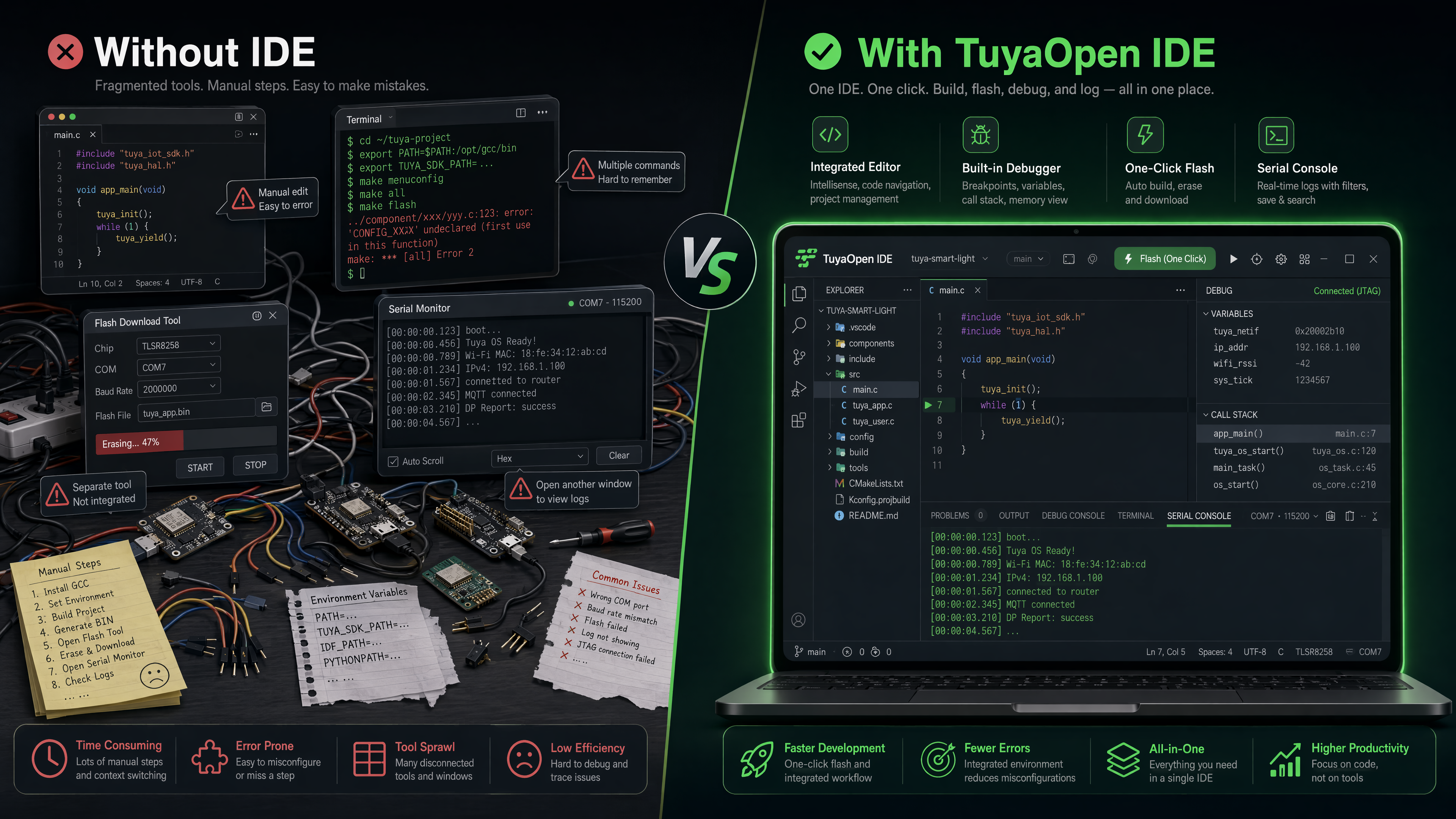
Configuring these toolchains manually is notoriously difficult. The ESP-IDF Programming Guide documents a setup process that, on a clean machine, involves installing Python, Git, the ESP-IDF repository, setting environment variables, and resolving platform-specific dependency conflicts. First-time embedded developers routinely report spending 4 to 8 hours on this step alone. A purpose-built IoT IDE like the TuyaOpen IDE handles all of this automatically — detecting your target hardware and configuring the appropriate toolchain with zero manual intervention.
Hardware Flashing and Serial Communication
Once code compiles, it must be transferred to the physical device — a process embedded developers call "flashing." This involves communicating with the chip's bootloader over USB, UART, or JTAG, often requiring specific baud rates, voltage levels, and timing sequences that differ across board models. After flashing, developers need a serial monitor to view debug output printed by the running firmware.
In a general-purpose IDE, flashing requires an external utility like esptool.py or avrdude, and serial monitoring requires a separate terminal application. The TuyaOpen IDE integrates both functions: one-click flash with automatic board detection, and an embedded serial monitor with log filtering and timestamp support. This tight integration eliminates the most common sources of frustration in embedded workflows.
Library and SDK Management
The average IoT project depends on 12 to 18 external libraries, according to data from the PlatformIO Registry, which hosts over 15,000 embedded libraries. Managing dependencies across different hardware platforms is a significant challenge — a library that works perfectly on an ESP32-S3 may have memory allocation issues on an ESP32-C3 with its smaller RAM footprint. A dedicated IoT IDE should provide platform-aware dependency resolution that warns developers about known compatibility issues before build time.
Debugging Without an Operating System
Web and backend developers take debuggers for granted. Attach a debugger to a Node.js or Python process, set breakpoints, inspect variables — it works the same way everywhere. Embedded debugging is fundamentally harder because there is no operating system to mediate the debugging interface. The debugger must communicate directly with the chip's hardware debugging unit over JTAG or SWD protocols, and the developer must understand memory maps, interrupt vectors, and register states.
Modern IoT IDEs abstract much of this complexity. They provide visual breakpoint management, variable watch windows, and stack trace analysis that translate hardware-level debugging information into human-readable form. The TuyaOpen IDE debugging interface supports ESP32 and ARM Cortex-M targets with a unified debugging experience comparable to what desktop developers expect.
The Industry Context: Why IoT Tooling Matters Now
The embedded systems market is undergoing a structural expansion that makes IoT-specific development tooling more important than ever.
Espressif, the manufacturer of the ESP32 microcontroller family, reported shipping over 400 million ESP32 chips as of their 2025 annual results. The ESP32 has become the de facto standard for connected IoT products, appearing in smart home devices, industrial sensors, agricultural monitors, and consumer wearables. This massive installed base means that the developer experience around ESP32 tooling directly impacts a significant portion of the global IoT industry. For those selecting an ESP32 development board, the choice of IDE is often as consequential as the choice of hardware itself — a poorly configured toolchain can mask hardware capabilities, while a well-integrated one surfaces them.
The broader IoT market is projected to reach $1.6 trillion by 2027, according to IDC's Worldwide Internet of Things Spending Guide, driven by growth in smart manufacturing, connected healthcare, and building automation. Every one of those deployments requires firmware development, and firmware development requires an IDE.
At the same time, geopolitical factors are reshaping how companies think about their development toolchains. The EU Cyber Resilience Act, which entered into force in 2025, mandates software transparency requirements for connected devices sold in European markets. For IoT product companies, this means choosing development tools that support reproducible builds, software bill of materials (SBOM) generation, and auditable supply chains. Open-source IDEs and SDKs have a natural advantage in meeting these requirements because their transparency is inherent rather than negotiated.
Open Source vs. Proprietary IoT Development Stacks
The embedded development ecosystem is split between proprietary and open-source approaches, and the choice has significant long-term implications for product teams.
Proprietary stacks — such as those from major semiconductor vendors — provide polished, vertically integrated experiences but lock developers into specific hardware ecosystems. If a supply chain disruption forces a hardware change, the entire firmware stack may need to be rewritten for a different vendor's tools.
Open-source stacks — exemplified by the ESP-IDF framework, Arduino, and the TuyaOpen platform — provide hardware flexibility and community-driven improvement. The trade-off has historically been setup complexity, but purpose-built open-source IDEs have largely closed this gap. A developer can now go from unboxing an ESP32-C3 Super Mini to running firmware in under 15 minutes — a workflow that previously consumed an afternoon.
The TuyaOpen IDE represents this convergence: an open-source core with pre-configured support for ESP32 series, Arduino-compatible boards, and Tuya T5 chips, combining the transparency benefits of open source with the ease of use traditionally associated with proprietary tools. For developers experimenting with open source AI for Arduino code, it provides a ready-made bridge between ML model output and microcontroller deployment.
Cloud IDEs for Embedded Development: Ready for Production?
Cloud-based development environments — where the IDE runs on a remote server and the developer accesses it through a browser — have become mainstream for web development through platforms like GitHub Codespaces and Gitpod. For embedded development, cloud IDEs present both unique opportunities and unique challenges.
The opportunity: Cloud IDEs eliminate machine-specific configuration entirely. Every developer on a team — whether sitting in Shenzhen, Berlin, or Silicon Valley — accesses an identical, pre-configured environment with the correct toolchain versions. This solves the "works on my machine" problem that is especially acute in embedded development, where subtle differences in compiler versions or Python environments can produce firmware builds that behave differently on identical hardware. For distributed teams collaborating on ESP32 with Arduino IDE projects, a cloud-based approach ensures every team member compiles against the exact same toolchain.
The challenge: Embedded development requires physical access to hardware. You cannot flash a chip or read a serial port through a browser without specialized bridging infrastructure. The Web Serial API, now supported in Chromium-based browsers, provides a standards-based solution: the cloud IDE communicates with locally connected hardware through the browser's serial port interface. This enables cloud-based embedded IDEs to flash firmware, read serial output, and even perform interactive debugging on physical hardware connected to the developer's local machine.
The TuyaOpen IDE Cloud supports Web Serial-based hardware interaction, enabling full embedded development workflows — from code editing to firmware flashing to serial debugging — entirely through a browser, with zero local toolchain installation. For teams evaluating SDK developer kit options for their IoT projects, the cloud delivery model eliminates one of the most persistent sources of friction in embedded onboarding: getting the first "blink" program running on a new board.
How AI Is Reshaping Embedded Development Environments
The question of how AI agents will change research and development is not hypothetical in 2026 — it is actively reshaping how firmware gets written. AI-assisted coding, which first gained traction in web development through tools like GitHub Copilot, has rapidly expanded into the embedded domain.
Embedded development turns out to be a particularly high-value target for AI assistance. The reason is structural: a disproportionate amount of embedded code is boilerplate — peripheral initialization sequences, interrupt service routine templates, FreeRTOS task creation patterns, and communication protocol setup. These code patterns are well-defined and repetitive, making them ideal candidates for AI generation. According to McKinsey's 2025 research on developer productivity, AI-assisted coding tools reduce development time by 35 to 45 percent for routine tasks and 20 to 30 percent for complex feature development — and in embedded systems, where "routine" initialization code can consume hours of a developer's week, these gains compound significantly.
The integration of AI SDK capabilities directly into the IDE is the next frontier. Rather than treating AI as an external service accessed through a chatbot interface, the IDE itself becomes AI-aware — understanding project context, hardware constraints, and the developer's intent in real time. When a developer types // configure BLE advertising with temperature data in the TuyaOpen IDE, the AI assistant generates the full BLE stack initialization, ADC configuration for the temperature sensor, advertising packet structure, and power management — all aware of the specific ESP32 variant and SDK version in use. This is the kind of deep integration that general-purpose AI coding tools cannot provide because they lack the hardware context that a domain-specific IDE maintains.
How to Choose an IDE for Embedded and IoT Development
Selecting the right IDE is one of the highest-leverage decisions an embedded team makes. A well-chosen environment reduces onboarding time for new team members, eliminates an entire category of configuration bugs, and surfaces hardware capabilities that a generic editor would leave hidden. Here are the criteria that matter most:
Hardware platform support: Does the IDE provide pre-configured toolchains for your target chips? If you are developing for ESP32, Arduino, and Tuya T5 simultaneously, switching between different IDEs for each platform creates friction. A unified environment that supports all three reduces context-switching overhead.
Toolchain automation: How much manual configuration is required before you can write your first line of code? The best IoT IDEs detect your hardware and configure the toolchain automatically. For developers who have spent hours debugging PATH variables and Python virtual environments just to get the ESP-IDF build system working, this criterion alone justifies the choice of a specialized IDE.
AI assistance quality: AI code generation is particularly valuable in embedded development. Look for AI assistance that understands embedded-specific patterns — memory-mapped I/O, FreeRTOS task management, and low-power sleep modes — not just general-purpose code completion.
Debugging integration: Can you set breakpoints, inspect variables, and view the call stack from within the IDE, or do you need external debugging tools? Integrated debugging saves embedded developers an estimated 3 to 5 hours per week, based on JetBrains' 2025 Developer Ecosystem Survey.
Open-source transparency: For teams shipping products into regulated markets, the ability to audit your development toolchain is increasingly a compliance requirement under frameworks like the EU Cyber Resilience Act. Open-source IDEs and SDKs provide this transparency by default.
The TuyaOpen IDE was purpose-built to meet these criteria for the IoT development community: multi-platform hardware support (ESP32, Arduino, Tuya T5), one-click toolchain configuration, AI-assisted coding tuned for embedded patterns, integrated hardware debugging, and a fully open-source core.
The Future of IDEs: What Embedded Developers Should Expect by 2028
Several emerging trends will reshape embedded development environments over the next two to three years:
AI-native development flows: The next generation of AI assistance will move beyond code completion into autonomous development agents. An embedded developer will describe a firmware feature in natural language — "add BLE temperature sensor reporting with deep sleep between readings" — and the IDE's AI agent will generate the initialization code, configure the BLE stack, set up the ADC for sensor reading, implement the sleep-wake cycle, and generate the partition table. Tools like Claude Agent SDK and Claude Code SDK are early indicators of this direction, providing programmatic access to AI coding capabilities that can be embedded directly into development workflows.
Federated build systems: As RISC-V gains traction in the embedded market — RISC-V International reports that RISC-V SoC shipments grew approximately 40 percent year-over-year in 2025 — build systems will need to support an increasingly diverse set of target architectures. Federated build systems that distribute compilation across local machines, cloud servers, and edge devices will become the norm.
SBOM and compliance automation: The EU Cyber Resilience Act and similar regulations will make software bills of materials mandatory for all connected devices. Future IDEs will generate SBOMs automatically as part of the build process, tracking every library, dependency version, and compiler flag used to produce a firmware binary.
Hardware-in-the-loop testing integration: Future embedded IDEs will integrate hardware-in-the-loop testing, where firmware is automatically deployed to physical test boards, exercised against a test suite, and results are reported back into the IDE — all within a single development workflow.
Frequently Asked Questions
What does IDE stand for? IDE stands for Integrated Development Environment. In the context of software development, it always refers to a unified application that combines code editing, compilation, debugging, and deployment tools.
What is the difference between an IDE and a code editor? A code editor edits text. An IDE includes a compiler, debugger, build system, dependency manager, and project management tools in addition to editing. For embedded development specifically, an IDE also manages cross-compilation toolchains and hardware flashing — capabilities no code editor provides natively.
What is the best IDE for ESP32 development in 2026? For ESP32 development specifically, the TuyaOpen IDE, PlatformIO (as a VS Code extension), and Arduino IDE 2.x are the three most widely used options. TuyaOpen IDE distinguishes itself with pre-configured toolchains and AI assistance purpose-built for embedded workflows.
Can embedded development be done in a cloud IDE? Yes. Through the Web Serial API, cloud-based embedded IDEs can communicate with locally connected hardware. The TuyaOpen IDE Cloud supports this workflow, enabling complete embedded development through a browser.
Why do IoT developers need a specialized IDE instead of a general-purpose one? General-purpose IDEs lack integrated support for cross-compilation toolchains, hardware flashing, serial monitoring, and platform-specific debugging interfaces. Configuring these manually typically requires 4 to 8 hours.
Is TuyaOpen IDE free and open source? Yes. The TuyaOpen IDE is built on an open-source foundation and is available for free. It supports ESP32 series chips, Arduino-compatible boards, and Tuya T5 hardware.
References
- TuyaOpen IDE — AI-Powered IoT Development Environment
- TuyaOpen Tools — AI SDK & Developer Kits
- TuyaOpen Hardware Docs — ESP32 Development Boards & Arduino IDE Support
- TuyaOpen AI Agent Dev Platform — How AI Agents Are Changing Development
- TuyaOpen Arduino Quick Start — Open Source AI for Arduino Code
- Eclipse Foundation — 2025 IoT Developer Survey
- IDC — Worldwide Internet of Things Spending Guide
- Espressif — ESP-IDF Programming Guide
- EU Cyber Resilience Act — Digital Strategy
- PlatformIO Registry — Embedded Library Ecosystem
- McKinsey — Developer Productivity and AI-Assisted Coding
- JetBrains — 2025 Developer Ecosystem Survey
- RISC-V International — Industry Adoption Reports
- GitHub Copilot — AI-Powered Development
- Web Serial API — MDN Web Docs
This article is part of the TuyaOpen FAQ series. For more guides on IoT development, embedded toolchains, and open-source hardware platforms, visit the TuyaOpen documentation center.