ESP32-S3's Features, Use Cases, and How to Build AI IoT Devices
The ESP32-S3 is Espressif's answer to a very specific problem: microcontrollers were getting fast enough to run small machine-learning models, but they were still awkward to connect, program, and ship. The S3 is a dual-core Xtensa LX7 chip that keeps the Wi-Fi and Bluetooth of the original ESP32 while adding something the classics never had — SIMD vector instructions and additional AI-oriented registers that turn modest neural-network inference from a stunt into a practical feature. If you have browsed Espressif's official SoC catalog and wondered why the S3 appears in so many new boards, the short answer is that it is the first ESP32 that treats on-device AI as a first-class job. The full technical detail lives in Espressif's product documentation and the ESP-IDF programming guide, both of which are worth bookmarking before you design anything around the chip.
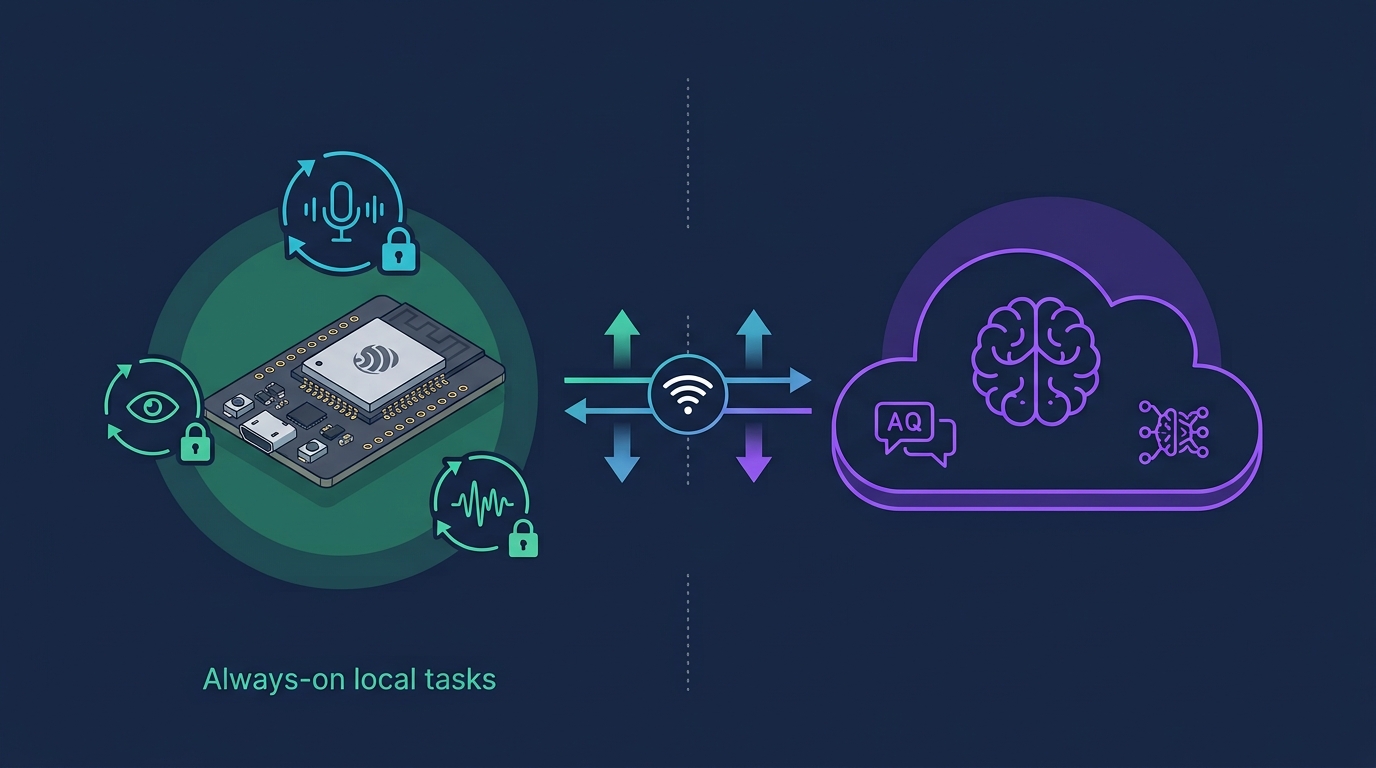
The reason this matters in 2026 is that edge inference has moved from a research curiosity to a product requirement. The TinyML Foundation tracks a steady expansion of microcontroller-class machine learning, and analysts at Arm note that running models locally is now the default for latency- and privacy-sensitive features. That is exactly the trade the S3 makes: instead of streaming audio or camera frames to a cloud that adds latency, cost, and a privacy question, the S3 can run a wake-word detector, a keyword spotter, or a lightweight vision model on the device itself. For anyone building an AI companion, a smart sensor, or a voice-enabled appliance, the difference between "cloud-dependent" and "runs on the board" is the difference between a product that works offline and one that does not.
This guide covers what the ESP32-S3 actually is, how it compares with the rest of the family, where it wins and where it does not, and how to start developing on it. It is written around the open-source TuyaOpen SDK, which bundles the cloud connectivity, over-the-air update path, and AI plumbing that a production device needs, so you can spend your time on the application rather than on infrastructure. If you would rather see the chip in context first, the ESP32 overview page is a good companion read.
What the ESP32-S3 Actually Is
At its core, the ESP32-S3 is a system-on-chip with two Xtensa LX7 cores running up to 240 MHz, Wi-Fi 4 (2.4 GHz) and Bluetooth 5 (LE), and a set of additions aimed squarely at AI and multimedia workloads. The headline change over the original ESP32 is the PIE vector extension — a set of 128-bit SIMD instructions that accelerate the math behind neural networks, plus extra registers that let the chip process more data per cycle.
Around that core, the S3 adds the peripherals that modern devices need: more GPIO, USB OTG support that lets the chip act as a native USB device without a bridge chip, additional SPI and I2C controllers, a camera interface, and a rich set of low-power features. The full pin and peripheral map is documented in Espressif's technical reference manuals, and if you are wiring a board for the first time, you will want to keep that open next to our ESP32 pinout guide.
The practical effect is that the S3 sits in an unusual position: it is far more capable than a general-purpose microcontroller, yet it draws a fraction of the power of an application processor. That combination is what makes it a favorite for battery-powered devices that still need to do something intelligent.
Start building on the ESP32-S3
TuyaOpen ships the SDK, toolchain, and cloud integration so you can go from a blank board to a connected, AI-capable device. Explore the TuyaOpen ESP32 overview →
ESP32-S3 vs. ESP32, S2, C3, and C6
Choosing an ESP32 variant is the first decision in any project, and the differences are more than cosmetic. Here is how the S3 compares with its siblings.
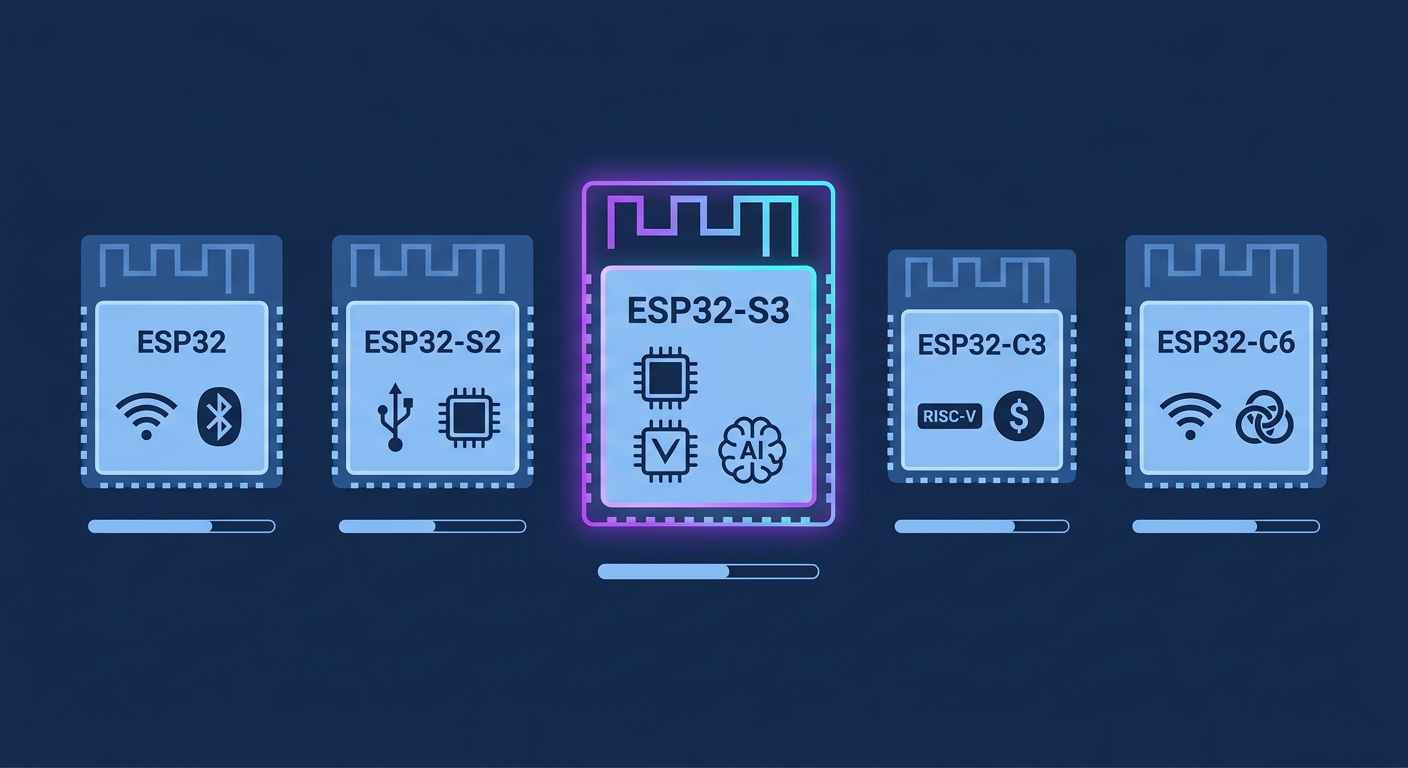
ESP32-S3 vs. the original ESP32. The classic ESP32 is still a fine choice for straightforward Wi-Fi and Bluetooth work, and it is often cheaper. The S3 wins when you need vector math for AI, native USB, or more GPIO. If your project involves audio, vision, or any on-device model, the S3 is the one to pick.
ESP32-S3 vs. ESP32-S2. The S2 added native USB and more GPIO but kept a single core and no vector extension. The S3 is effectively the S2 plus dual cores plus AI acceleration, which is why the S2 has become niche.
ESP32-S3 vs. ESP32-C3. The C3 uses a single RISC-V core and targets cost-sensitive, low-power devices. It is excellent for simple sensors and switches, but it lacks the S3's vector engine and second core. The C3 is where you go when the job is small and the budget is tight — see our ESP32-C3 Super Mini guide for that end of the spectrum.
ESP32-S3 vs. ESP32-C6. The C6 adds Wi-Fi 6 and 802.15.4 for Thread and Matter, making it the better pick for smart-home interoperability. The S3 remains the better pick for AI and multimedia. Many products use both: a C6 for the radio and an S3 for the intelligence.
The honest summary is that the S3 is the "do more on the device" chip. If your roadmap includes voice, vision, or on-device models, start there.
Not sure which ESP32 fits?
TuyaOpen documents each supported chip and board, so you can match the silicon to the project before you buy. Compare Espressif hardware on TuyaOpen →
Where the ESP32-S3 Shines
The S3 is not a universal upgrade; it is a targeted one. The categories where it earns its cost are consistent.
- Voice interfaces. Wake-word detection and keyword spotting need the same small models run continuously, and the S3's vector instructions make that cheap in both cycles and power. This is the foundation of most DIY and commercial voice devices.
- Camera and vision. With a camera interface and enough compute for small vision models, the S3 handles simple detection tasks — motion classification, presence, gesture — locally. Our IP camera design notes cover the hardware side.
- Edge AI sensor fusion. Combining a few sensors and running a small model on the result is a natural fit, and it keeps raw data on the device, which is a privacy win.
- Rich human-machine interfaces. Native USB and ample GPIO make the S3 a good host for screens, buttons, and LEDs, which is why so many display boards use it.
- Connectivity-heavy products. Wi-Fi plus Bluetooth 5 LE covers pairing, provisioning, and control without extra silicon.
The common thread is a device that has to do something locally and then report the result. That is precisely where cloud round-trips hurt most.
Where the ESP32-S3 Is the Wrong Choice
Being clear about the limits saves money. The S3 is overkill, or simply misaligned, in several situations.
- Simple sensors and switches. A battery contact sensor or a smart plug does not need vector math. An ESP32-C3 or a cheaper MCU will do the job for less.
- Matter-first products. If interoperability with Matter ecosystems is the priority, the ESP32-C6 is a better starting point.
- Heavyweight inference. If you need to run a large vision model, a Linux-class board such as a Raspberry Pi will be more comfortable than any microcontroller.
- Tight BOM budgets at volume. The S3 costs more than the C3, and at scale that difference compounds.
Matching the chip to the job is the whole discipline. The S3 is the right answer for a specific, growing class of product — and the wrong answer everywhere else.
Pick the right ESP32 before you prototype
TuyaOpen's hardware documentation covers the full Espressif range so you do not have to guess. Browse the hardware docs →
Getting Started: From Board to Blinking LED
The ESP32-S3 development path is well worn, and the tooling has matured to the point where a first build takes minutes rather than an afternoon.
Step 1 — Choose a board. Development boards based on the S3 come in many shapes, from minimal breakout boards to full kits with screens, cameras, and audio codecs. The TuyaOpen dev board pages list supported hardware, which saves you from the most common beginner mistake: buying a board whose pinout does not match any published example.
Step 2 — Set up the toolchain. You can use Espressif's official ESP-IDF framework directly, or an Arduino-based flow if you prefer. Both are fully supported by TuyaOpen, and the environment setup guide walks through the dependencies for each.
Step 3 — Flash a first example. Start with something trivially verifiable — a blinking LED or a serial hello-world — so that any problem you hit is a toolchain problem, not an application problem.
Step 4 — Add connectivity. Once the board builds and flashes reliably, bring in Wi-Fi provisioning and the cloud connection. This is where a full-stack SDK earns its keep, because pairing, credentials, and reconnection logic are exactly the parts that are tedious to write from scratch.
Step 5 — Add the AI layer. Only after the device is connected and updating reliably should you add the model. This ordering keeps the debugging surface small at every stage.
Go from blank board to connected device
The TuyaOpen quick-start covers toolchain, flashing, and first cloud connection in one place. Start the quick-start →
Developing on the ESP32-S3 with TuyaOpen
TuyaOpen is an open-source AI+IoT SDK that treats the ESP32-S3 as a first-class target. Its value is not any single feature but the fact that it assembles the unglamorous parts of a connected product into one coherent stack.
- A consistent hardware abstraction. The same application code can move between supported chips and boards, which matters when a product line spans an S3 for the smart model and a C3 for the cheap model.
- Cloud connectivity out of the box. Device provisioning, authentication, and the Tuya IoT cloud link are handled, so you are not rebuilding an MQTT client and a credential store for every project. The cloud overview explains the architecture.
- Over-the-air updates. Field-updatable firmware is table stakes for a shipped product and a frequent source of bugs when homegrown. TuyaOpen includes the update path.
- AI demos you can build on. The SDK ships working examples, including a chat-bot demo, that show how on-device and cloud AI are meant to cooperate.
- Tooling for the boring parts. tyutool and the web serial console cover flashing and debugging without a local toolchain, which is a genuine convenience for field engineers.
The code itself lives in the TuyaOpen GitHub repository, so you can read exactly what you are depending on — an important property if you plan to ship it.
AI on the Edge: What the S3 Can Realistically Run
It is worth calibrating expectations, because "AI on a microcontroller" means something specific.
The S3 comfortably runs small models measured in tens to low hundreds of kilobytes: keyword spotting, simple audio classification, basic gesture or motion recognition, and small vision models at low resolution and low frame rates. It will not run a large language model locally, and it will not do real-time high-resolution object detection. The realistic architecture is a division of labor: the S3 handles the always-on, latency-sensitive, privacy-sensitive layer — detecting a wake word, spotting motion, classifying a sound — and the cloud handles the heavy reasoning when it is actually needed.
That division is not a compromise; it is good engineering. It keeps the always-on path cheap and private, reduces cloud cost, and lets the device keep working when the network does not. For a worked example of the pattern, the device-AI demos in TuyaOpen show how on-device sensing and cloud reasoning combine.
Power, Cost, and Real-World Trade-offs
Three practical numbers decide most S3 designs.
Power. The S3 is efficient for its capability, but "always-on inference" still costs energy. Use deep sleep aggressively, wake on the event you actually care about, and keep the radio off when it is not needed. For battery devices, the difference between a thoughtful power design and a careless one is measured in weeks of runtime.
Cost. The S3 costs more than the C3 and less than a Linux board. At prototype scale that is irrelevant; at volume it drives architecture. Many product lines use an S3 where the intelligence lives and cheaper chips at the edges.
Thermals and layout. Vector math draws current, and Wi-Fi draws more. A board that runs cool on a desk can behave differently in a sealed enclosure. Plan your layout and your enclosure early, not after the first thermal surprise.
Common ESP32-S3 Mistakes
- Assuming the classic ESP32 pinout. The S3 assigns GPIO differently. Always check the specific board's schematic before wiring.
- Powering peripherals from the board's regulator without checking the budget. Cameras and displays in particular can brown out a marginal supply.
- Skipping OTA from day one. Retrofitting an update path onto a deployed fleet is painful; build it in before you ship.
- Choosing the S3 when a C3 would do. Capability you do not use is cost you did pay.
- Treating the USB port as purely for programming. On the S3 it can be a native USB device, which unlocks entirely different product designs.
FAQ: ESP32-S3
Is the ESP32-S3 good for AI? Yes, for small on-device models such as keyword spotting and simple vision. It is not a replacement for a Linux-class board running large models; the realistic pattern is on-device sensing plus cloud reasoning.
ESP32-S3 or ESP32-C3 — which should I choose? The S3 for AI, multimedia, USB, and extra GPIO; the C3 for simple, cost-sensitive, low-power devices. Match the chip to the job.
Does the ESP32-S3 support Matter? It can run Matter stacks, but if smart-home interoperability is your primary goal the ESP32-C6, with Wi-Fi 6 and 802.15.4, is the more natural fit.
What language can I program it in? C and C++ through ESP-IDF and through Arduino-compatible frameworks, with TuyaOpen providing an SDK layer on top.
Can I use the ESP32-S3 in a commercial product? Yes. It is widely used in production devices, and using an open-source SDK like TuyaOpen keeps you in control of the code you ship.
Final Thoughts
The ESP32-S3 is the chip you reach for when a device needs to think a little for itself. Vector instructions, dual cores, native USB, and generous GPIO make it the practical choice for voice interfaces, simple vision, and any product that benefits from keeping its intelligence local. It is not the cheapest ESP32 and not the best pick for every job, but for the growing category of AI-capable, battery-friendly devices it is the obvious starting point.
If that is the product you are building, the fastest path is to start from a working stack rather than a blank repository. TuyaOpen gives you the SDK, the cloud connection, the update path, and the AI demos — so the first thing you ship is a device, not a toolchain. Start with the TuyaOpen ESP32 overview →