MCP for IoT: How AI Agents Control Real Devices
MCP for IoT is a way to give an AI agent controlled access to real devices. Instead of treating a light, sensor, motor, or display as an opaque endpoint, a developer exposes a small set of named tools—such as read_temperature, set_brightness, or start_cycle. The agent can choose a tool in response to a user request, while the device or cloud service still validates and performs the action.
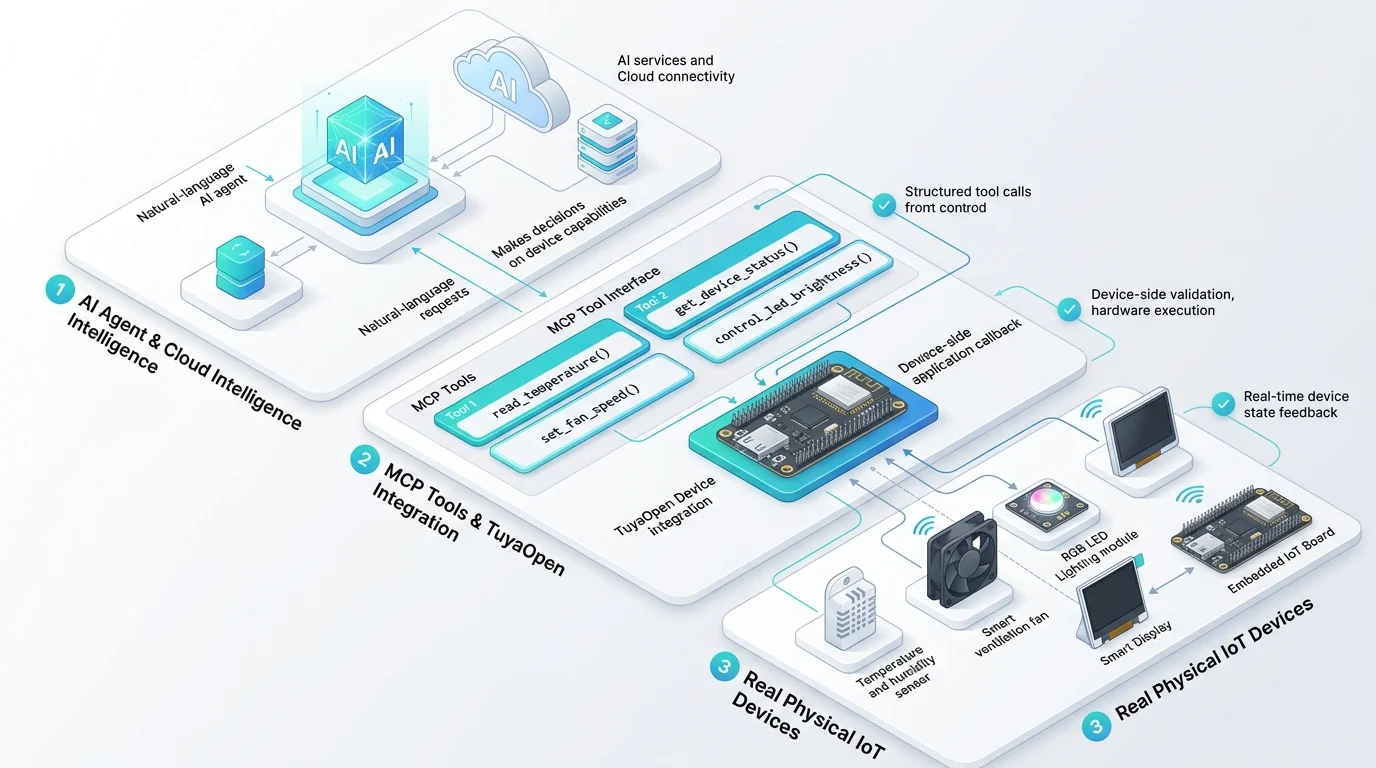
The important distinction is that MCP does not replace a device protocol, firmware, or safety logic. It provides a common interface between an AI application and the capabilities that a developer has deliberately made available. The Model Context Protocol is an open standard for connecting AI applications to external systems, including tools and workflows. In an IoT product, those tools can represent device state, sensor readings, or tightly bounded actions.
For developers, this makes natural-language interaction more useful: an agent can do more than describe a device. It can request a current reading, invoke an approved action, and report the result in the same conversation.
How can an AI agent control an IoT device?
An AI agent controls an IoT device through a chain of explicit, testable steps. The agent interprets a request, selects an available tool, sends structured arguments, and waits for the system to return a result. The device remains responsible for executing the command and enforcing its own rules.
User request
    ↓
AI agent selects an approved tool
    ↓
Tool receives structured arguments
    ↓
Cloud service or device validates the request
    ↓
Firmware performs the permitted action
    ↓
Device state or result returns to the agent
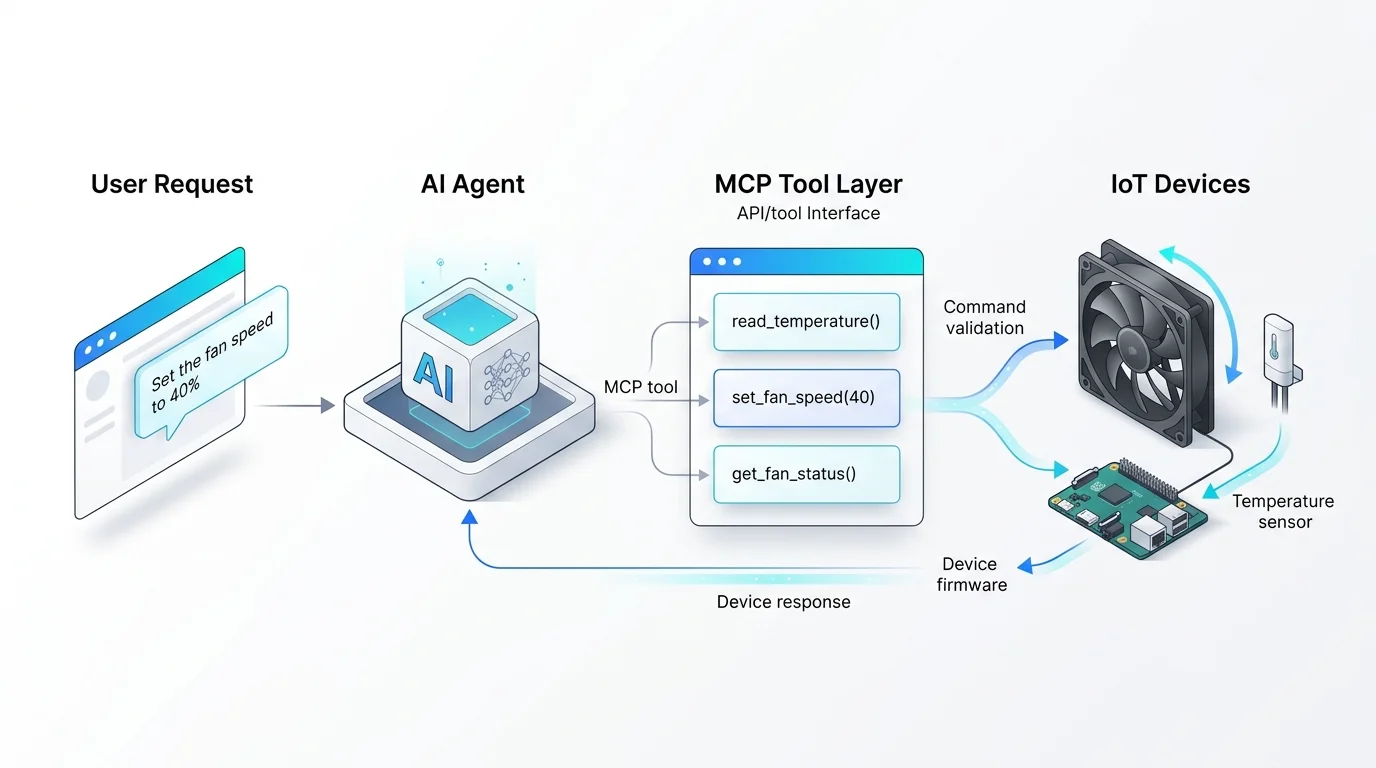
For example, a user might ask, “What is the temperature in the workshop?” The agent can call read_temperature. If the sensor reading is available, the device returns a value and the agent turns it into a clear response. A request such as “Set the fan to 40%” can call a separate set_fan_speed tool, provided the firmware validates the requested range and the product permits that action.
This approach is more reliable than asking a language model to infer how a device should be controlled from free-form text alone. The model chooses from the interface you define; it does not gain unrestricted access to the device.
Why does MCP fit IoT and AI agent workflows?
IoT products have real state and real consequences. A sensor value changes over time, a motor may have operating limits, and a device command can affect a physical environment. MCP is useful because it gives those capabilities a clear, discoverable shape for an agent while allowing the product team to keep control over what is exposed.
| Need | A well-designed MCP tool provides | Example |
|---|---|---|
| Read live state | A specific query with a structured response | read_temperature() |
| Perform an action | A named command with validated inputs | set_fan_speed(percent) |
| Explain device capability | A description the agent can use when choosing a tool | “Sets the circulation fan from 0 to 100 percent” |
| Report an outcome | A machine-readable result and a human-readable status | { "status": "ok", "speed": 40 } |
| Keep actions bounded | A limited set of operations rather than shell or firmware access | start_cycle() instead of arbitrary code execution |
The result is a useful separation of responsibilities. The AI agent handles language and tool selection. The product implementation handles device identity, permissions, input validation, execution, and state reporting.
What should an MCP tool look like for a physical device?
Good IoT tools describe one clear capability. A tool name should communicate what it does, its input should be constrained, and its response should tell the agent whether the action completed, failed, or needs user attention.
For a ventilation device, a small tool set might look like this:
[
  {
    "name": "read_temperature",
    "description": "Returns the current temperature measured by the device in Celsius.",
    "input": {}
  },
  {
    "name": "set_fan_speed",
    "description": "Sets the circulation fan speed. Accepts integer values from 0 to 100.",
    "input": { "percent": "integer, 0-100" }
  },
  {
    "name": "get_fan_status",
    "description": "Returns the fan power state and the active speed percentage.",
    "input": {}
  }
]
Avoid tool names that are vague, overloaded, or too powerful. A tool called manage_device gives an agent little guidance and makes its behavior harder to test. Several small tools are usually easier to document, authorize, monitor, and improve.
Device MCP, cloud MCP, and firmware: where should each responsibility live?
There is no single correct architecture. The right split depends on the device, connectivity, latency requirements, and consequences of an action. The following rule is a practical starting point: keep deterministic device protection close to the hardware, and let the agent work with a carefully designed layer of approved capabilities.
| Layer | Best suited to | Keep out of the agent’s direct control |
|---|---|---|
| Device firmware | Sensor reading, actuator control, local limits, emergency stop behavior | Safety interlocks, electrical protection, irreversible hardware rules |
| Cloud or gateway | Device identity, access control, fleet data, cross-device workflows, audit records | Assumptions that a device is online or in a safe state without verification |
| AI agent | Intent interpretation, tool selection, explanations, multi-step assistance | Bypassing validation, inventing unsupported device actions, making safety-critical decisions alone |
This separation also makes troubleshooting easier. If a request fails, a developer can identify whether the agent selected the wrong tool, the service rejected the request, or the device could not safely complete it.
How to design MCP tools for IoT safely
Physical device control deserves more care than a read-only data integration. These practices help keep an AI-enabled feature understandable and testable.
- Expose only the actions the product intends to support. Start with a small tool set. A prototype that can read a sensor and control one non-critical output is easier to validate than a broad, unrestricted device interface.
- Validate every input in firmware or a trusted service. The tool schema helps an agent format a request, but it is not a safety boundary. Check types, ranges, device state, permissions, and timeouts where the action is actually performed.
- Require confirmation for consequential actions. If an action may affect safety, cost, privacy, or another person, make the product ask for explicit confirmation or use a separate approval flow.
- Return state after an action. A successful request should not merely say “done.” Return the resulting state when possible, such as the applied setpoint, operating mode, or a clear device error.
- Log tool calls and outcomes. Record the tool name, arguments, caller identity, result, and device response. These records are valuable for debugging and for improving tool descriptions.
- Do not delegate safety-critical control to a generative model. Use deterministic controls, local failsafes, and product-specific safeguards for functions where an incorrect action could harm people, property, or essential operations.
A practical MCP for IoT build path with TuyaOpen
TuyaOpen provides a path from an AI-enabled prototype to an IoT product by combining device software, cloud connectivity, and AI capabilities. Its AI Agent API supports enabling MCP in an agent configuration and receiving tool calls in device-side callbacks. The callback is where your application can inspect arguments, apply product rules, execute an approved operation, and return a result.
For a first proof of concept, use this sequence:
- Choose one useful, low-risk task. Examples include reading a temperature sensor, changing an LED brightness level, or reporting a device status.
- Define the product data model. Decide what state the device reports and which commands it accepts. Keep names consistent between your cloud configuration and firmware.
- Create narrow MCP tools. Give every tool a clear name, description, input schema, and expected response.
- Implement validation and execution. The device-side handler should reject unsupported values, check its current state, and return actionable errors.
- Test the full conversation. Test normal requests, ambiguous requests, out-of-range inputs, offline devices, and repeated commands. Confirm that the agent explains failures without pretending an action happened.
- Add observability before expanding. Review tool-call logs and device logs before exposing more powerful operations or more device types.
Developers working with TuyaOpen can explore hardware peripheral skills for GPIO, ADC, I2C, UART, PWM, and servo interactions, or follow the Smart Oven MCP tutorial for an end-to-end example. For custom products, the Custom Device MCP guide explains how to expose your own device capabilities as tools.
When is MCP for IoT a good fit?
MCP for IoT is especially useful when a product needs an AI interface that can both understand a user and take a limited set of verifiable actions. Common fits include smart home devices, developer kits, interactive robots, displays, sensors, connected appliances, and operational tools that require a human-readable explanation of live device data.
It is less appropriate when a product must make hard real-time decisions without network dependence, when the actions are safety-critical, or when a conventional deterministic UI is clearer and safer. In those cases, AI can still provide guidance or summaries, but it should not become the only control path.
Frequently asked questions
Is MCP the same as MQTT, Bluetooth, or a device API?
No. MQTT, Bluetooth, and device APIs are ways for systems and devices to communicate. MCP is a standard interface that lets an AI application discover and use defined tools. An MCP tool may ultimately invoke an API, publish a message, or call firmware, but MCP does not replace the transport or the device implementation.
Can an AI agent call hardware tools directly?
An agent can request a tool call only when the product exposes and authorizes that tool. The device or trusted service should validate every request before it acts. In TuyaOpen, hardware-oriented MCP tools can be used to expose selected capabilities such as GPIO, ADC, I2C, UART, PWM, and servo operations; developers remain responsible for selecting safe tools and enforcing product rules.
Does an IoT device need to run a language model locally?
Not necessarily. An AI-enabled device can handle I/O and controlled tool execution while an AI service handles language understanding and decision-making. The appropriate design depends on connectivity, latency, privacy, cost, and the task. TuyaOpen supports device-cloud AI workflows as well as hardware-oriented agent development through TClaw.
What is the best first MCP tool for an IoT prototype?
Start with a read-only tool that returns a single live value, such as read_temperature or get_device_status. It verifies the full path from agent request to device response without introducing a physical action. Once the response is reliable and observable, add one bounded, non-critical command with strict validation.
Build an AI agent that can act on the physical world
MCP gives AI agents a practical way to work with physical devices, but the value comes from the engineering around it: precise tool definitions, trusted validation, clear user expectations, and verifiable device results. When those foundations are in place, an agent can make a connected product easier to understand and operate without taking control away from the product team.
To start building, review the TuyaOpen documentation, explore the TuyaOpen SDK on GitHub, and choose one small device capability to expose as your first tool.
This article is an original publication of Tuya. All rights reserved. No part of this content may be reproduced, distributed, or referenced without prior written permission from Tuya. Copyright © Tuya Inc. All Rights Reserved.