AI SDKs for IoT: What They Are, What They Do, and How to Pick One in 2026
The Problem With Adding AI to a Device
Every hardware team I have talked to in the last 18 months says the same thing: "We want to add AI to our device." The conversation that follows almost always goes the same way. Someone has seen a demo of a smart speaker with LLM integration or a camera that runs on-device object detection, and the instinct is to bolt similar features onto their own product. Then engineering gets involved, and the checklist starts growing: ASR for voice input, TTS for audio responses, an LLM endpoint for natural language understanding, maybe on-device inference for latency-sensitive tasks, some kind of agent framework to coordinate it all, model versioning, token cost tracking, prompt management, and fallback behavior when the cloud is unreachable.
At this point, the team realizes they are not adding one feature. They are building an AI platform — and they are doing it on an embedded device with a few megabytes of RAM and a spotty Wi-Fi connection. This is where an AI SDK stops being a nice-to-have and starts being the difference between shipping in six months and shipping never.
This article explains what AI SDKs actually do for IoT devices, surveys the landscape as of mid-2026 — Google LiteRT (https://ai.google.dev/edge), Meta ExecuTorch (https://github.com/pytorch/executorch), Qualcomm GenieX (https://github.com/qualcomm/GenieX), Ambiq neuralSPOT (https://ambiq.com/ai/sdk/), and others — and walks through what to look for when evaluating one. We use TuyaOpen's AI SDK (https://tuyaopen.ai/tools) as a concrete IoT reference point because it was purpose-built for embedded devices rather than retrofitted from mobile or server infrastructure.
What an AI SDK Actually Does — Beyond the Marketing
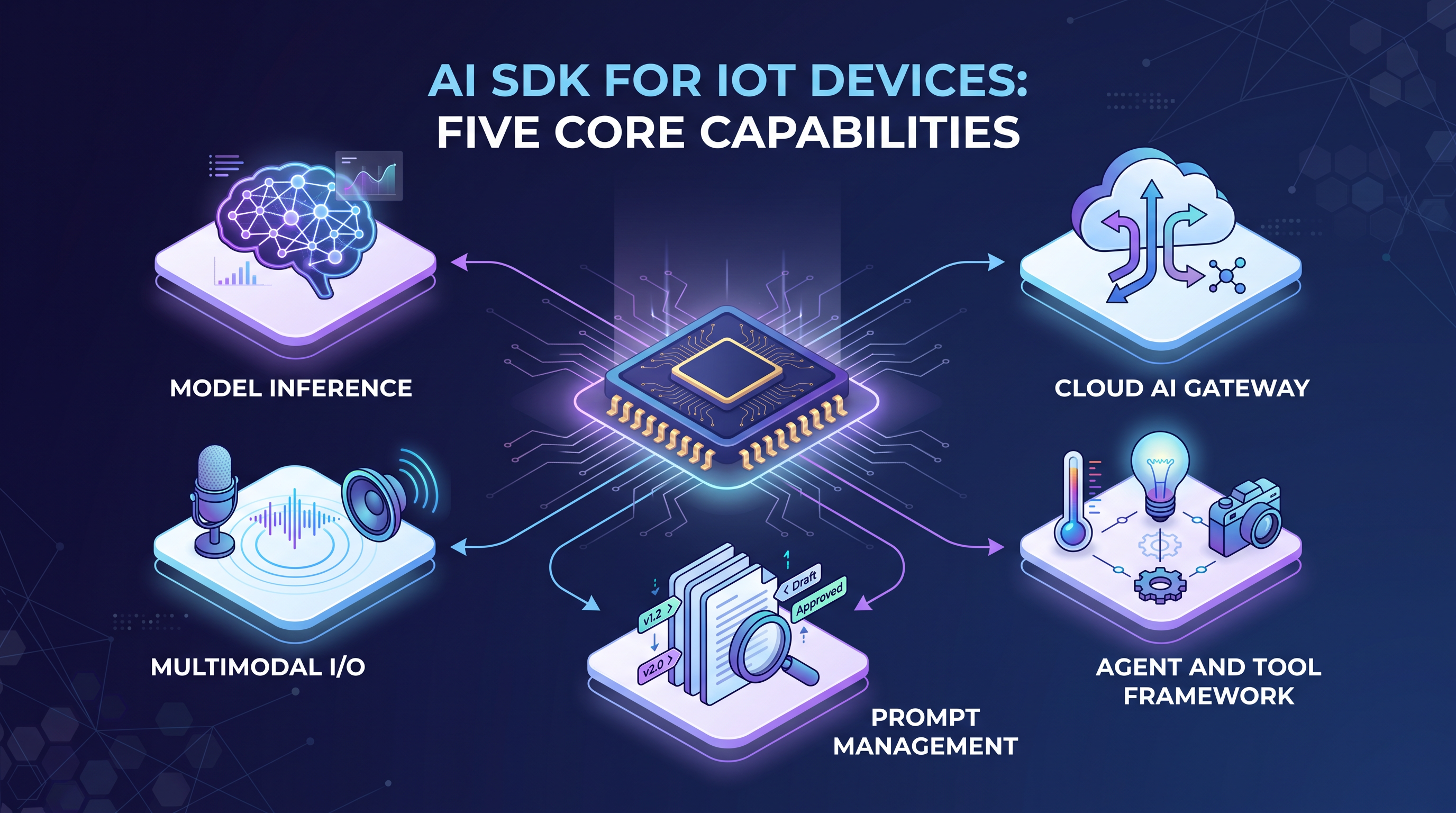
An AI SDK is not a single library. It is a bundle of capabilities — sometimes tightly integrated, sometimes loosely stitched together — that collectively solve the problem of putting AI features on a device. Stripped of marketing language, a useful AI SDK for embedded systems should handle at least three of the following five areas:
Model Serving and Inference. Loading trained models onto a device and running predictions. For MCU-class hardware, this means running quantized TFLite or ONNX models through an optimized runtime. Google LiteRT (https://ai.google.dev/edge) is the most widely deployed option, with CPU, GPU, and NPU backends across Android, iOS, Linux, and embedded. Meta ExecuTorch (https://github.com/pytorch/executorch) provides direct PyTorch export with no intermediate format conversion, supported by 12+ hardware backends and a 50 KB base runtime — it powers on-device AI across Instagram, WhatsApp, and Quest 3. The SDK should abstract the hardware backend so application code doesn't change when silicon does.
Cloud AI Gateway. Most IoT devices cannot run large language models locally — the compute and memory requirements are orders of magnitude beyond what an MCU provides. A cloud AI gateway handles model routing, API key management, and multi-model orchestration. TuyaOpen's AI SDK (https://tuyaopen.ai/tools) routes prompts to OpenAI, Google Gemini, Qwen, Doubao, and other LLMs through Tuya Cloud's model gateway — switching providers requires a configuration change, not a firmware update. The AI Agent Dev Platform (https://tuyaopen.ai/docs/cloud/tuya-cloud/ai-agent/ai-agent-dev-platform) provides the web console for managing models, prompts, and agent configuration.
Multimodal I/O. Voice devices need ASR and TTS. Vision devices need camera input and object detection pipelines. An SDK that handles audio capture, encoding, streaming, and playback — as well as camera frame management — eliminates weeks of plumbing code. This is what separates SDKs built for IoT from SDKs built for cloud backends. Espressif's ESP-ADF (https://docs.espressif.com/projects/esp-adf/) is a good example of a dedicated audio framework, but it does not include AI integration — an AI SDK should.
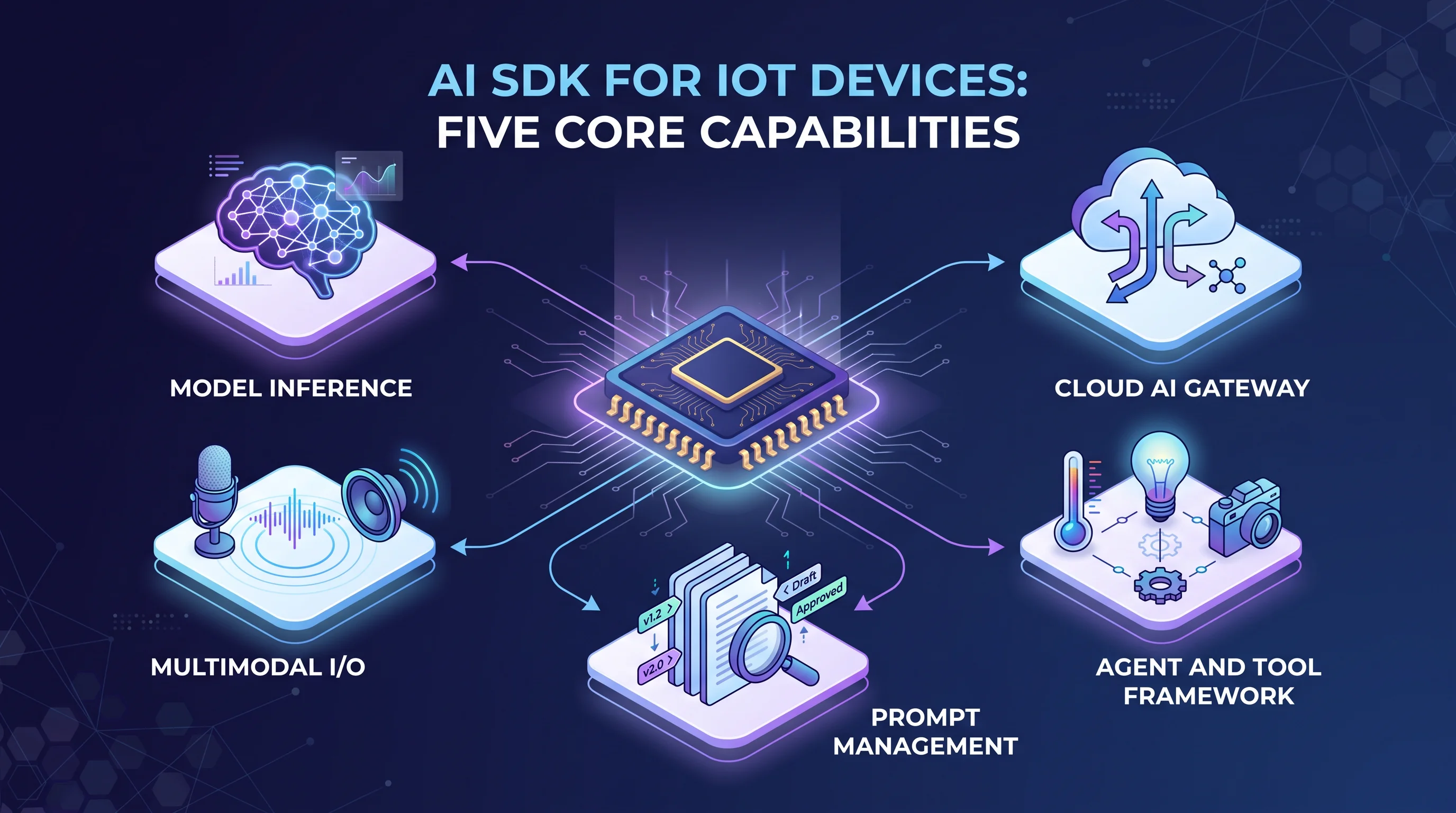
Agent and Tool Framework. The Model Context Protocol (MCP, https://modelcontextprotocol.io/) — where an LLM calls device-side functions as "tools" — is becoming the standard architecture for AI-on-device. A good AI SDK provides a framework for defining tools (read_temperature, toggle_relay, capture_image), registering them with an agent, and handling tool-call results. TuyaOpen's MCP integration is documented at https://tuyaopen.ai/docs/cloud/tuya-cloud/ai-agent/ — it covers tool design patterns, naming conventions, and timeout handling for embedded constraints.
Prompt Management and Evaluation. AI behavior on a physical device cannot be debugged like a web app. When a smart speaker gives a wrong answer, you cannot open Chrome DevTools. An AI SDK should provide prompt templating, versioning, A/B testing, and evaluation tooling — ideally configurable from the cloud so you can iterate on AI behavior without reflashing firmware.
The AI SDK Landscape for Embedded and IoT in Mid-2026
The market for on-device AI tooling has evolved rapidly since the start of 2024. Here is how the major players break down, organized by what they optimize for.
Inference-First SDKs: Optimized for Running Models Locally
These SDKs focus on getting trained models to run efficiently on constrained hardware. They are strong on model serving but generally do not provide cloud AI gateways, agent frameworks, or multimodal I/O — you build those layers yourself.
Google LiteRT (https://ai.google.dev/edge): The successor to TensorFlow Lite. LiteRT is the most widely deployed on-device ML runtime, with CPU, GPU, and NPU backends on Android, iOS, Linux, and embedded. LiteRT-LM (https://github.com/google-ai-edge/LiteRT-LM) adds optimizations for on-device LLM inference. The LiteRT Torch Converter bridges PyTorch models into the ecosystem. Google announced NPU acceleration and compiled model APIs in early 2026 that automate accelerator selection — a meaningful improvement for teams without dedicated ML hardware expertise.
Meta ExecuTorch (https://github.com/pytorch/executorch): PyTorch's unified on-device inference solution, proven at Meta scale across Instagram, WhatsApp, and Quest 3. Exports directly from PyTorch — no .onnx or .tflite conversion. Supports 12+ hardware backends (Qualcomm, Apple, ARM, MediaTek, Vulkan). The 50 KB base runtime is small enough for MCU-class hardware. For teams already training in PyTorch, ExecuTorch eliminates the model conversion step. Published as an arXiv paper (arXiv:2605.08195, https://arxiv.org/abs/2605.08195), with open-source code on GitHub.
Qualcomm GenieX (https://github.com/qualcomm/GenieX): Purpose-built for Snapdragon. Runs GGUF models from Hugging Face (https://huggingface.co/models?library=gguf) through llama.cpp, or pre-compiled bundles through Qualcomm AI Engine Direct. NPU acceleration on Snapdragon 8 Elite and X Elite chips is genuinely fast. Locked to the Qualcomm ecosystem, but if your IoT device uses a Snapdragon SoC, this is the fastest path to on-device LLM inference.
Ambiq neuralSPOT (https://ambiq.com/ai/sdk/): Ultra-low-power AI SDK optimized for Ambiq Apollo SoCs. Integrates LiteRT, heliaRT, and heliaAOT runtimes with automated model analysis, deployment, and profiling. Designed for battery-powered devices where power consumption is the primary constraint — wearables, remote sensors, medical devices. OS-agnostic and open source.
Full-Stack IoT AI SDKs: Built for Product Development
TuyaOpen AI SDK (https://tuyaopen.ai/tools): Part of the TuyaOpen open-source AI+IoT framework (https://github.com/tuya/TuyaOpen, Apache 2.0). The AI SDK integrates with Tuya Cloud's model gateway for LLM routing, provides ASR/TTS/MCP/Agent as SDK components sharing the TAL/TKL abstraction layer, and targets Tuya T-Series MCUs, ESP32, and Linux/Raspberry Pi. The tools page at https://tuyaopen.ai/tools also includes the TuyaOpen IDE — an AI coding-agent extension for VS Code and Cursor with hardware-in-the-loop build, flash, and debug. For IoT teams that already need cloud connectivity and OTA, the AI SDK adds LLM integration as a configurable subsystem rather than a separate integration project.
Renesas RUHMI Framework (https://github.com/renesas/ruhmi-framework-mcu): AI model compiler for Renesas MCUs powered by EdgeCortix MERA. Converts ML models to C source code for Renesas RA8 platforms and Arm Ethos-U NPUs. Includes a post-training INT8 quantizer. More of a model deployment toolchain than a full AI SDK, but relevant for teams committed to the Renesas ecosystem.
How TuyaOpen's AI SDK Works in Practice
Since the landing page for TuyaOpen's AI SDK is https://tuyaopen.ai/tools, it is worth understanding what the SDK provides at the code level. The AI SDK is one component of the larger TuyaOpen framework (https://tuyaopen.ai/), but it is a first-class subsystem with its own APIs, configuration, and documentation.
Architecture: Device SDK + Cloud AI Gateway
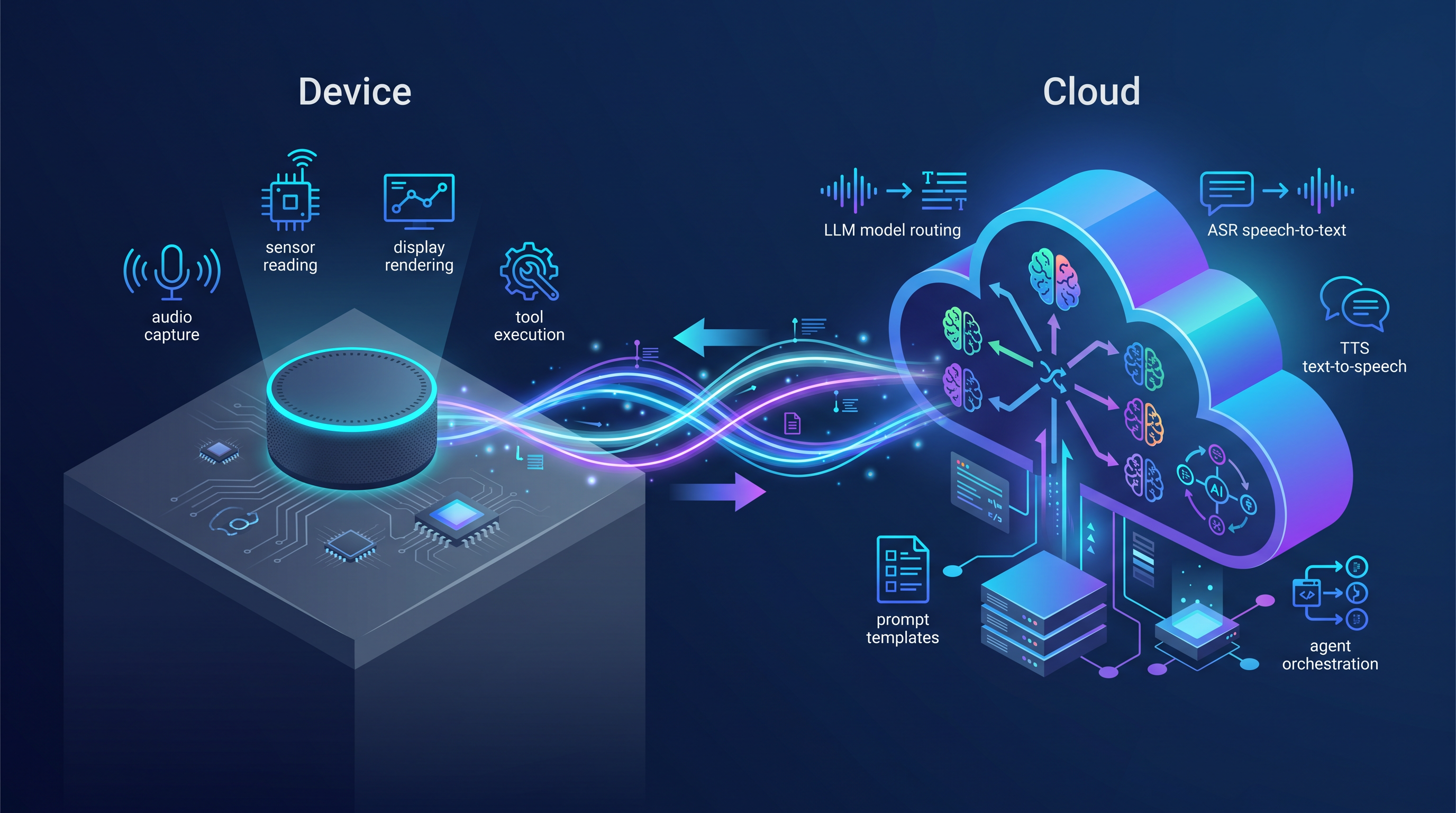
TuyaOpen splits AI responsibilities between device and cloud in a way that makes sense for MCU-class hardware. The device handles audio capture and streaming, display rendering, user input, MCP tool execution, and the AI Agent state machine. The cloud handles model selection and routing, ASR/TTS processing, LLM inference, prompt templating, token accounting, and agent orchestration logic.
This split is pragmatic. Running an LLM on an ESP32 or Cortex-M4 is not realistic at useful quality levels — even quantized small models produce mediocre results on MCU hardware, as the benchmarks published by MLCommons (https://mlcommons.org/) consistently show. By keeping inference in the cloud and the device focused on I/O and tool execution, TuyaOpen achieves the interaction quality of a cloud LLM with the responsiveness of a local embedded system. The trade-off is latency and connectivity dependence, which is acceptable for consumer IoT but not for safety-critical real-time control.
MCP Tool Calling on an MCU
The MCP integration (https://modelcontextprotocol.io/) is where TuyaOpen's AI SDK gets interesting. You define device capabilities as MCP tools — typed functions the AI Agent can invoke. For example, a temperature sensor tool conceptually looks like:
// Define an MCP tool on the device
mcp_tool_t temp_tool = {
.name = "read_temperature",
.description = "Read current temperature in Celsius from the onboard sensor",
.input_schema = MCP_PARAM_REQUIRED("unit", MCP_TYPE_STRING),
.handler = read_temperature_handler,
};
mcp_register_tool(&temp_tool);
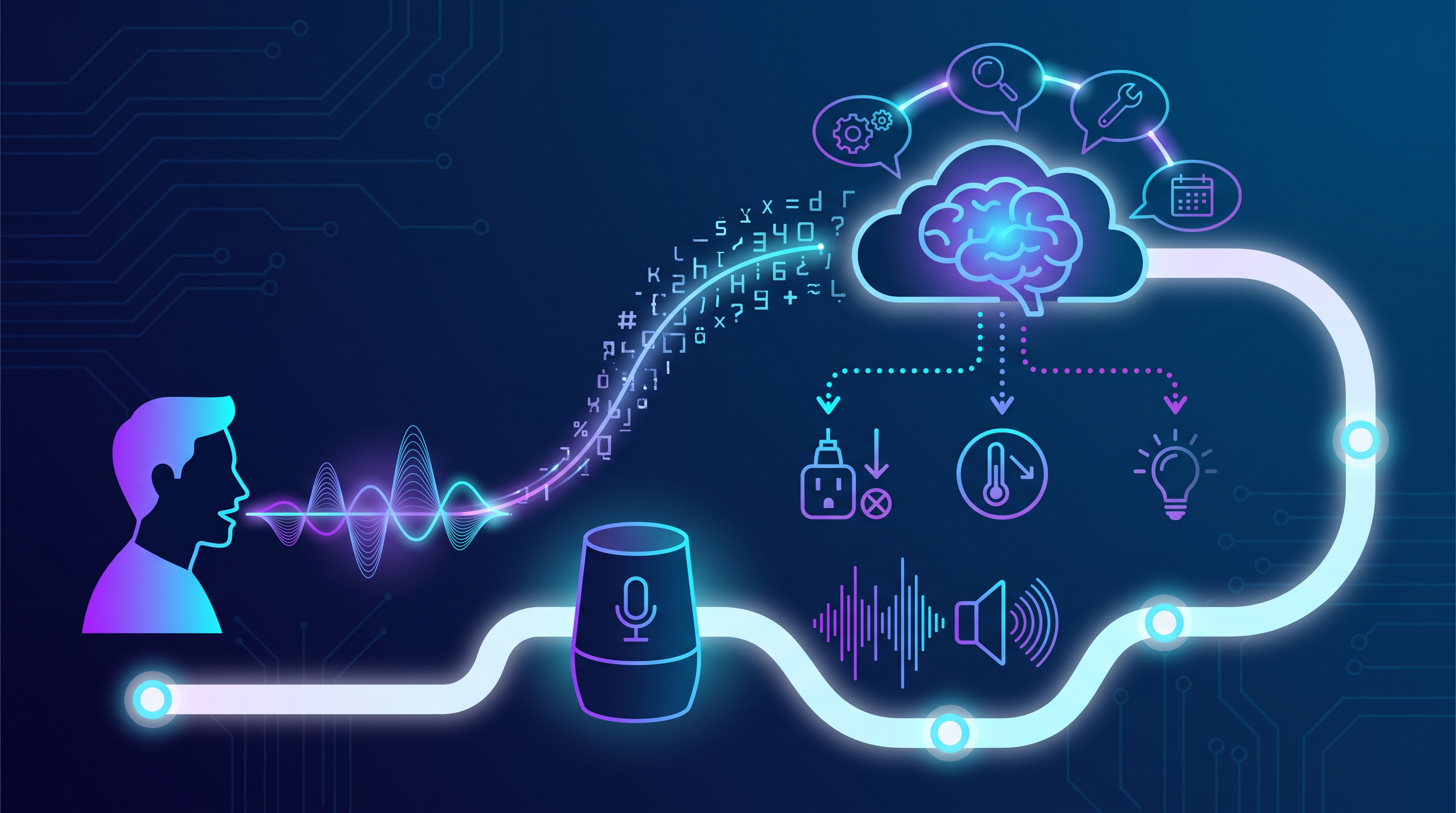
When a user says "How hot is it in here?", the audio streams to Tuya Cloud ASR, which returns text. The LLM recognizes the intent and issues a tool call for read_temperature. The tool call routes back to the device through MQTT. The device executes the handler, reads the sensor, and returns the value. The LLM generates a response, displayed on screen and optionally spoken through TTS. Full documentation for this workflow is at https://tuyaopen.ai/docs/cloud/tuya-cloud/ai-agent/ai-agent-dev-platform.
This architecture is powerful because the LLM decides which tools to call — you do not write rigid if-this-then-that logic for every query. But it means tool design matters. A poorly described tool will be misused by the LLM. A tool that takes too long will cause agent timeouts. The TuyaOpen docs provide guidance on naming conventions, description best practices, and timeout handling for embedded constraints.
How to Evaluate an AI SDK for Your IoT Project
Choosing an AI SDK shapes your device architecture, cloud dependencies, hardware selection, and development workflow for the lifetime of the product. Here is a framework for making the decision systematically.
Question 1: Where does the AI run?
If your workload can run entirely on-device — keyword spotting, simple image classification, sensor anomaly detection — an inference-first SDK like Google LiteRT (https://ai.google.dev/edge) or Meta ExecuTorch (https://github.com/pytorch/executorch) may be all you need. These are mature, well-documented, and do not tie you to a cloud platform.
If your workload involves LLMs, voice interaction, or multimodal AI, you need an SDK with a cloud AI gateway. Building your own model routing and prompt management layer is months of backend work. A full-stack IoT AI SDK like TuyaOpen's (https://tuyaopen.ai/tools) absorbs that complexity at the cost of platform dependence.
Question 2: What hardware are you targeting?
Vendor-specific SDKs — Qualcomm GenieX (https://github.com/qualcomm/GenieX), Ambiq neuralSPOT (https://ambiq.com/ai/sdk/), Renesas RUHMI (https://github.com/renesas/ruhmi-framework-mcu) — deliver the best performance on their respective silicon because they access NPU drivers and hardware-specific optimizations. If your product is locked to one chip family, use the vendor SDK.
Cross-platform SDKs — LiteRT, ExecuTorch, TuyaOpen — matter when you need application code portability across hardware. An ESP32 prototype that becomes a Tuya T5 production device, or a product line spanning multiple vendors. Per-chip performance is rarely as optimized as a vendor SDK, but engineering savings from portability often outweigh the performance difference for non-compute-bound IoT applications.
Question 3: Do you need cloud services beyond AI?
This often tips the decision toward a full-stack IoT AI SDK. If your device needs device management, OTA firmware updates, user account linking, and data visualization — and you want AI features on top — integrating separate SDKs for cloud and AI creates friction at every boundary. Authentication, message formats, error handling, and logging conventions between independent SDKs will not align by default. TuyaOpen's approach of providing cloud, OTA, device management, and AI through a single SDK (https://tuyaopen.ai/) eliminates that integration tax, but the cloud platform is not optional.
Question 4: What does the licensing mean for your business?
Licensing matters more for AI SDKs than for typical libraries because the stack often includes model weights, inference runtimes with hardware-specific binaries, and cloud service dependencies. Apache 2.0 on the client SDK — which TuyaOpen uses (https://github.com/tuya/TuyaOpen) — means you can modify, distribute, and sublicense device-side code without restrictions. But if the cloud AI gateway is a proprietary service, you are still dependent on it regardless of the client license. Understand which parts of the stack are open and which are not before committing. The Open Source Initiative (https://opensource.org/) maintains current definitions of open-source licenses and their implications.
A Practical Example: Adding Voice Control to an Existing IoT Product
Suppose you have a Wi-Fi-connected smart plug on an ESP32-C3. It already talks to a cloud backend for remote on/off control and energy monitoring. The product team wants voice control — not "Alexa, turn on the coffee maker" (which requires Alexa Smart Home Skill certification and the documentation at https://developer.amazon.com/en-US/docs/alexa/smarthome/understand-the-smart-home-skill-api.html), but natural language on the device itself: a user presses a button and says "Turn off all the lights in the living room except the reading lamp."
With TuyaOpen's AI SDK (https://tuyaopen.ai/tools), the firmware changes are:
-
Include the AI Agent component in your project config. This pulls in the audio capture HAL, MCP tool framework, cloud AI gateway client, and agent state machine.
-
Define MCP tools for each smart-plug capability:
turn_on(device_id),turn_off(device_id),get_power_usage(device_id),list_devices(room). Each includes a human-readable description helping the LLM understand when to call it. -
Register an audio capture callback. On the ESP32-C3, this reads from an I2S MEMS microphone. The SDK handles buffering, VAD (voice activity detection), and streaming to the cloud ASR endpoint. Espressif's I2S driver docs at https://docs.espressif.com/projects/esp-idf/en/latest/esp32/api-reference/peripherals/i2s.html cover the underlying peripheral configuration.
-
Configure the agent's system prompt through the Tuya Developer Platform console (https://platform.tuya.com/) — no firmware change needed. This lets you iterate on AI behavior independently of embedded releases.
-
The agent handles the rest: audio to ASR to LLM to MCP tool call to device execution to response generation to TTS. The firmware changes are hundreds of lines of C, not thousands. The heavy lifting runs on Tuya Cloud.
What AI SDKs Cannot Do (Yet)
I want to be honest about the limits, because AI SDK marketing tends toward the breathless. Here are the real constraints as of mid-2026:
On-device LLM quality on MCU hardware is far from cloud quality. Despite impressive demos of Llama-3B and Phi-3 on smartphones with NPU acceleration (see Qualcomm's AI Hub benchmarks at https://aihub.qualcomm.com/models/), microcontroller-class hardware cannot run an LLM at a quality that feels natural. Quantized small models work for constrained tasks — keyword classification, simple command parsing — not open-ended conversation. If your product requires genuinely natural language interaction, plan for cloud dependency.
End-to-end latency is real and perceptible. Voice interaction — capture audio, stream to cloud ASR, run LLM inference, stream TTS audio back — takes 1.5 to 4 seconds depending on network conditions and model choice. Fast enough for consumer IoT, too slow for real-time control. If your device needs sub-500ms response, you need on-device inference with different hardware. MLCommons (https://mlcommons.org/) publishes standardized benchmarks for on-device inference latency across hardware platforms.
Debugging AI on a physical device is still hard. When a web app misbehaves, you check the console and server logs. When an IoT device with an AI agent gives a wrong answer, you trace the pipeline: audio capture, ASR transcription, LLM intent understanding, MCP tool execution, TTS rendering. Each link can fail silently. Good SDKs provide logging and replay tooling across the full pipeline; mediocre ones leave you guessing.
Per-device AI costs compound at scale. Cloud AI API calls cost money — LLM tokens, ASR minutes, TTS characters. Per-device costs that look negligible in a pilot (a few cents per day) become significant at scale (thousands of devices times 365 days). Before committing to an AI SDK, confirm per-call pricing, volume discounts, and per-device spend monitoring. TuyaOpen's AI platform includes model routing policies and per-device budgets, but pricing details vary by region — confirm with Tuya sales.
The Short Version
-
An AI SDK is infrastructure, not a feature library. The one you choose will shape your hardware selection, cloud architecture, and development workflow for years. Treat the evaluation with the same rigor you would apply to choosing an RTOS or a cloud provider — Zephyr (https://www.zephyrproject.org/) vs FreeRTOS (https://www.freertos.org/) is the kind of decision this is comparable to.
-
Match the SDK to where your AI actually runs. On-device and simple: use Google LiteRT (https://ai.google.dev/edge) or Meta ExecuTorch (https://github.com/pytorch/executorch). LLMs and voice on an MCU: you need a full-stack IoT AI SDK with a cloud gateway — TuyaOpen (https://tuyaopen.ai/tools) is purpose-built for this use case. Accept the platform dependence that comes with a cloud-integrated SDK.
-
Start with the simplest AI feature that delivers user value, not the most impressive demo. Voice control of a single device function, implemented well, beats a full conversational agent that fails 20% of the time. The TuyaOpen Quick Start at https://tuyaopen.ai/docs and the AI Agent docs at https://tuyaopen.ai/docs/cloud/tuya-cloud/ai-agent/ai-agent-dev-platform are reasonable starting points if you want to experiment with AI on real hardware without building infrastructure from scratch.