Custom Wake Words with T5 + 2M-ASR-PRO
Add offline speech recognition to a T5 board with custom wake words and multi-role support.
Project Introduction
Add custom wake words to a T5 development board by attaching an ASR PRO speech-recognition module over UART — no audio-algorithm work required, and each wake word can map to a different Tuya AI Agent role. The T5 platform ships with a fixed set of default wake words:
- TuyaOS supports three default wake words: "Nihao Tuya" (Hello Tuya), "Xiao Zhi Tongxue" (Classmate Zhi), and "Hey, Tuya" (English).
- TuyaOpen supports four default wake words: "Nihao Tuya", "Xiao Zhi Tongxue", "Xiao Zhi Guanjia" (Butler Zhi), and "Nihao Xiao Zhi".
To go beyond the defaults, the options are:
- Add a voice recognition module
- Replace the wake word algorithm
- Custom wake word (for customization, please contact Tuya sales)
This tutorial takes the first route — adding an ASR PRO module — for the following advantages:
- Low technical barrier, no need to understand audio algorithms.
- Supports multiple wake words with Tuya AI Agent multi-role feature. Different wake words can correspond to different roles, avoiding awkward mismatches between roles and wake words.
- Supports offline speech recognition. The ASR PRO module supports offline neural network computation, enabling speech recognition without relying on a network. This ensures normal operation even in environments with no or unstable network connectivity.
- High recognition rate. The ASR PRO module features strong echo cancellation and environmental noise suppression, maintaining high speech recognition accuracy even in noisy environments. The recognition rate can reach over 98%, with a response time of less than 0.15 seconds.
Required Materials
| Hardware | Function/Parameters |
|---|---|
| T5 Development Board | Provides core AI conversation functionality |
| ASR PRO Module | Supports custom wake words and offline speech recognition |
| Serial Board or ASR-LINK Downloader | A standard CH340 serial board is sufficient for downloading programs to ASR PRO. If available, you can purchase the ASR-LINK automatic downloader. |
| Microphone | Used for audio pickup by the ASR PRO module |
2M ASR PRO Speech Recognition Module (Core Board)
Chip datasheet: View here
Appearance:
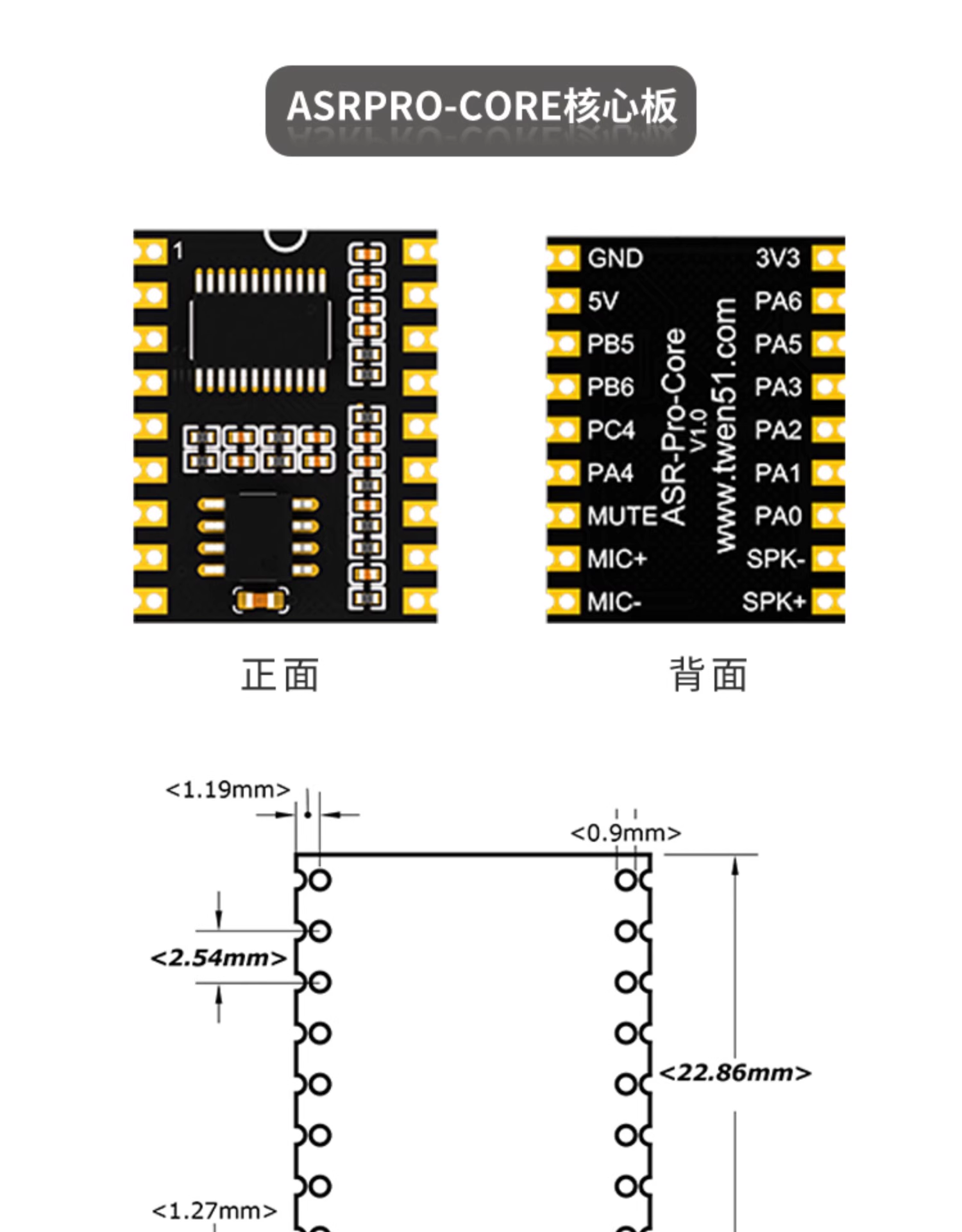
Hardware Wiring Instructions
First, you need to program and flash firmware to the ASR PRO, then connect the ASR PRO module to the T5 development board. Therefore, wiring is divided into two parts:
ASR PRO Flashing Wiring
| ASR PRO Module | Serial Board |
|---|---|
| GND | GND |
| 5V | 5V |
| PB5 (UART0 TX) | RX |
| PB6 (UART0 RX) | TX |
| MIC + | Mic + |
| MIC - | Mic - |
T5 Development Board to ASR PRO Module Connection
| T5 Development Board | ASR PRO Module |
|---|---|
| GND | GND |
| 5V | 5V |
| P10 (UART0 TX) | PB5 (RX) |
| P11 (UART0 RX) | PB6 (TX) |
| P12 (Wake Pin) | PA4 (Demo use, customizable). Note: If using serial wakeup, you can skip connecting the P12 wake pin. |
Demo Video
ASR PRO Program Development
Tuya AI Agent supports multiple roles, and the ASR PRO module supports up to 5 wake words, each with a unique recognition ID. You can design a program where each role has a dedicated wake word. When developing the ASR PRO program, you can use the recognition ID to distinguish wake words, for example, controlling different IO pins or sending data via serial to the main controller T5.
It is recommended to use Tianwen Block for developing the ASR PRO module. Its graphical programming interface is very beginner-friendly. You can download it from the Tianwen 51 official website.
Example Program
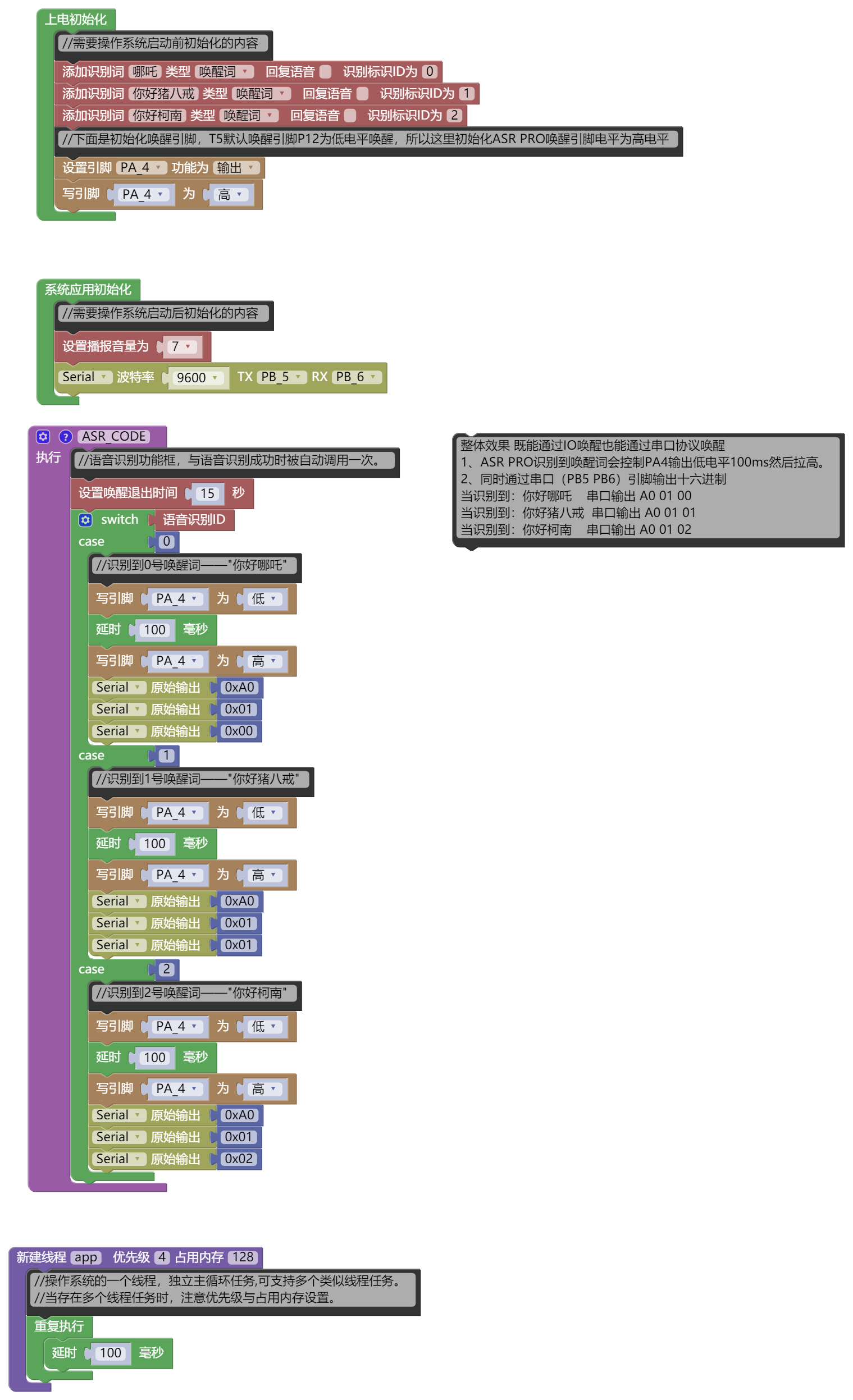
The system is configured with three wake words: "Hello Nezha", "Hello Zhu Bajie", and "Hello Conan". When the ASR PRO module recognizes any of these wake words, it should trigger the wake function via IO and output data via serial:
- After recognizing the wake word, ASR PRO will set PA4 to low for 100 ms, then pull it high.
- Outputs hexadecimal data via serial (PB5 PB6 pins).
| Wake Word | Serial Output |
|---|---|
| Hello Nezha | A0 01 00 |
| Hello Zhu Bajie | A0 01 01 |
| Hello Conan | A0 01 02 |
Downloads
- Reference code: Download here
- Firmware: Download here
- Flashing tool: Download here
Firmware Flashing
For instructions on firmware flashing, please refer to the video tutorial.
Reference image:
T5 Program Development
IO Wakeup
IO wakeup is relatively simple. Just connect the ASR PRO's wake pin to the T5's wake pin (default P12).
Serial Wakeup
For serial wakeup, simply check for the recognized wake command in the serial receive program and call the audio_recorder_start(); interface. Below is a serial example:
#include "tal_uart.h"
#include "tal_system.h"
#include "tal_log.h"
#include "base_event.h"
#include "tuya_cloud_types.h"
#include <stdio.h>
#include "audio_recorder.h"
#ifdef ENABLE_WIFI_SERVICE
#include "tuya_iot_wifi_api.h"
#else
#include "tuya_iot_base_api.h"
#endif
#define UART_BOUND 9600
STATIC THREAD_HANDLE my_uart_thread = NULL;
/***********************************************************
***********************typedef define***********************
***********************************************************/
#define ROLE_API "thing.ai.agent.switch.role"
#define API_VERSION "1.0"
typedef struct {
char *commandInfo;
char *description;
} TY_AI_ROLE_T;
/*
*commandInfo: the role ID, available from the Tuya Developer Platform
*/
const TY_AI_ROLE_T POST_CONTENTS[] = {
{"{\"commandInfo\": \"DIY_XEM_EPAXATC0U0W0\"}","小恶魔"},
{"{\"commandInfo\": \"DIY_XTS_EPAXBE3SFRB4\"}","小天使"},
{"{\"commandInfo\": \"DIY_SWK_EPAA4V9THGQO\"}","孙悟空"},
{"{\"commandInfo\": \"DIY_ZBJ_EPA9XXFY2WOW\"}","猪八戒"},
{"{\"commandInfo\": \"DIY_CE_EPA9SDZAXOG0\"}","嫦娥"},
{"{\"commandInfo\": \"DIY_TZ_EPA9NAVSDKAO\"}","唐僧" },
{"{\"commandInfo\": \"DIY_ND_EPAW3QRNEDQ8\"}","牛顿"},
{"{\"commandInfo\": \"DIY_HTL_EPAWROAK5TDS\"}","灰太狼"},
{"{\"commandInfo\": \"DIY_HLBT_EPAWXZXJJG8W\"}","哈利波特"},
{"{\"commandInfo\": \"DIY_KN_EPAX5IQQQOE8\"}","柯南"},
{"{\"commandInfo\": \"SYS_GJXY_EKGXPAQA11J4\"}","杠精小丫"},
};
int g_role_max = sizeof(POST_CONTENTS) / sizeof(POST_CONTENTS[0]);;
/***********************************************************
***********************variable define**********************
***********************************************************/
/**
* @brief http task
* switch role
* @param[in] param:Task parameters
* @return none
*/
VOID switch_iot_role(char *role_name)
{
OPERATE_RET rt = OPRT_OK;
ty_cJSON* result = NULL;
CHAR_T *print_data = NULL;
const CHAR_T post_count = sizeof(POST_CONTENTS) / sizeof(POST_CONTENTS[0]);
CHAR_T i;
for(i=0; i<post_count; i++)
{
if(strstr(POST_CONTENTS[i].description,role_name) != NULL) {
break;
}
}
// check whether the index is valid
if(i >= post_count) {
TAL_PR_ERR("Role not found: %s", role_name);
return;
}
TAL_PR_DEBUG("Processing POST_CONTENT[%u]: %s", i, POST_CONTENTS[i].commandInfo);
// call the HTTP POST function, passing the specified array element
rt = iot_httpc_common_post_simple(ROLE_API, API_VERSION, POST_CONTENTS[i].commandInfo, NULL, &result);
if (NULL == result) {
TAL_PR_DEBUG("result is NULL");
return;
}
print_data = ty_cJSON_PrintUnformatted(result);
if (NULL != print_data) {
TAL_PR_NOTICE("%s", print_data);
ty_cJSON_FreeBuffer(print_data);
print_data = NULL;
}
ty_cJSON_Delete(result);
result = NULL;
return;
}
STATIC VOID __uart0_rev_task(VOID *arg)
{
UINT8_T rx_data[256];
INT_T ret_len=0;
OPERATE_RET rt = OPRT_OK;
int uart_num=TUYA_UART_NUM_0;
while ((1))
{
int cnt=0;
// determine the read timeout
while(tal_uart_get_rx_data_size(uart_num)<1){
cnt++;
if(cnt>5){
break;
}
tal_system_sleep(10);
}
if(cnt>5) continue;
ret_len = tal_uart_read(uart_num,rx_data,sizeof(rx_data));
char STR[128]= {0};
if(ret_len != 0)
{
TAL_PR_HEXDUMP_DEBUG("UART_RX:",rx_data,ret_len);
if(rx_data[0] == 0xA0 && rx_data[1] == 0x01) {
switch (rx_data[2]) // Assuming rx_data[2] contains the command type
{
case 0x00:
{ /* Nezha wake word */
sprintf(STR, "哪吒");
break;
}
case 0x01:
/* Zhu Bajie wake word */
{
sprintf(STR, "猪八戒");
break;
}
case 0x02:
/* Conan wake word */
{
sprintf(STR, "柯南");
break;
}
default:
break;
}
switch_iot_role(STR);
audio_recorder_start();
// tuya_voice_proto_get_tts_text(STR); // text dialogue, sends STR content to the Agent
TAL_PR_DEBUG("-------------->wake word: %s", STR);
}
}
}
tal_thread_delete(my_uart_thread);
my_uart_thread = NULL;
}
OPERATE_RET my_asr_uart_thread(VOID)
{
OPERATE_RET rt = OPRT_OK;
TAL_UART_CFG_T cfg = {0};
cfg.base_cfg.baudrate = UART_BOUND;
cfg.base_cfg.databits = TUYA_UART_DATA_LEN_8BIT;
cfg.base_cfg.stopbits = TUYA_UART_STOP_LEN_1BIT;
cfg.base_cfg.parity = TUYA_UART_PARITY_TYPE_NONE;
cfg.rx_buffer_size = 256;
cfg.open_mode = O_BLOCK;
tal_uart_deinit(TUYA_UART_NUM_0);
TUYA_CALL_ERR_RETURN(tal_uart_init(TUYA_UART_NUM_0,&cfg));// uart 0 init
THREAD_CFG_T param;
param.priority = THREAD_PRIO_3;
param.stackDepth = 1024*4;
param.thrdname = "my_uart_asr_thread";
TUYA_CALL_ERR_RETURN( tal_thread_create_and_start(&my_uart_thread, NULL, NULL,__uart0_rev_task ,NULL , ¶m));
TAL_PR_DEBUG("======_asr_uart_ task success==============");
return rt;
}