How to Build an AI Voice Assistant with TuyaOpen
Building an AI voice assistant from scratch used to require a stack of cloud API keys, a custom PCB, and weeks of firmware debugging. In 2026, the barrier has dropped dramatically: the open-source TuyaOpen SDK can capture your voice, run keyword spotting locally, stream speech to a large language model, and play back a spoken response — all with fewer than 500 lines of application code. TuyaOpen runs cross-platform on the Tuya T5 chip, Espressif ESP32, Raspberry Pi, and other ARM/RISC-V targets — write once, deploy anywhere. If you have been searching for "how to build an AI voice assistant" or looking for a practical DIY voice-controlled IoT device, this guide walks you through the entire pipeline from hardware selection to a working prototype.
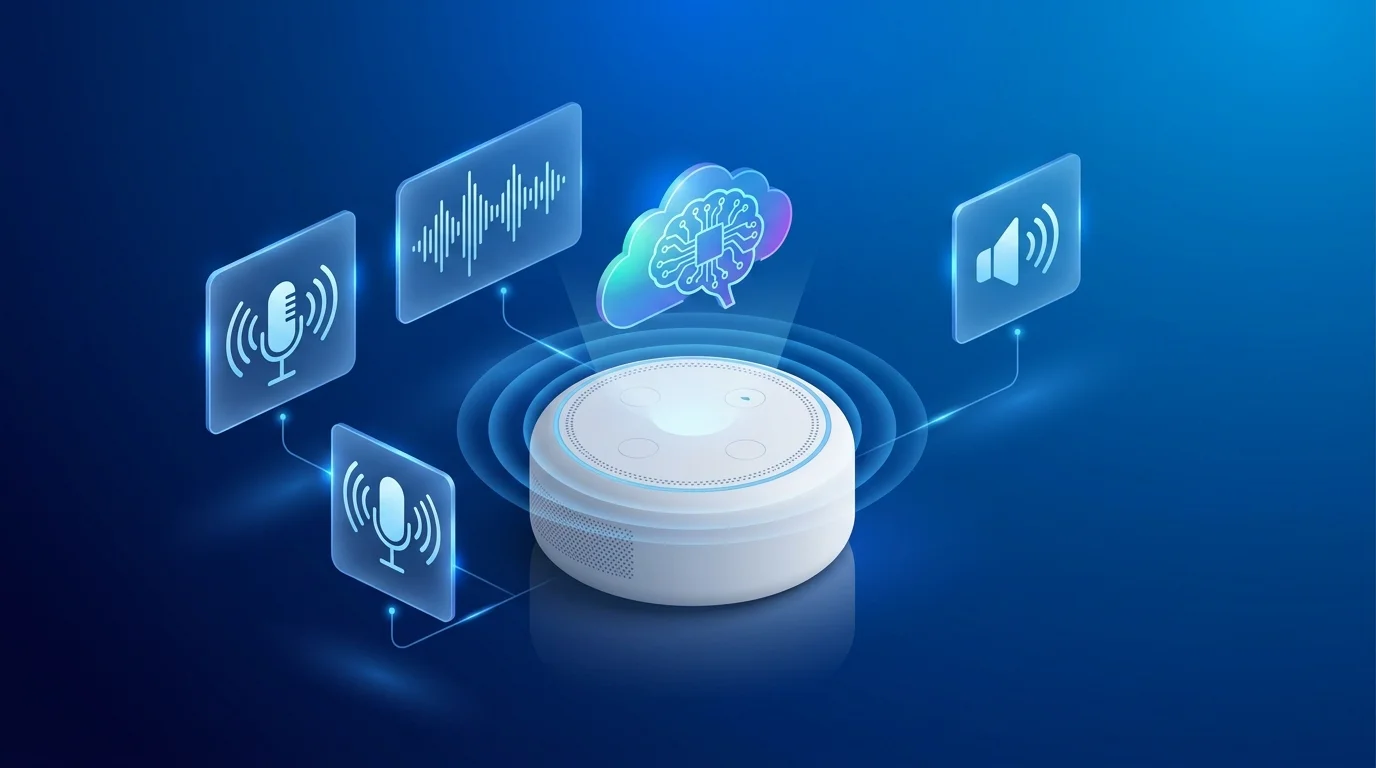
The approach here is different from most "talk to ChatGPT" tutorials that simply pipe audio through a laptop. We are building a voice-controlled IoT device that runs on a microcontroller, connects to Wi-Fi, integrates with Tuya Cloud for device management, and supports multiple LLM backends — DeepSeek, ChatGPT, Gemini, Qwen, and Doubao — through a single unified API. The TuyaOpen platform handles the heavy lifting: audio capture, voice activity detection (VAD), automatic speech recognition (ASR), LLM routing, text-to-speech (TTS), and audio playback. You focus on the application logic.
Whether you are prototyping a smart home voice hub, a wearable AI companion, or an agentic AI gadget that can reason about sensor data and take autonomous actions, the architecture in this article scales from proof-of-concept to production. And because TuyaOpen is Apache 2.0 licensed with a GitHub repository that has attracted over 1.8k stars and 1.3 million developers, you are building on infrastructure validated across hundreds of millions of commercially deployed devices — not a weekend hack that falls apart at scale.
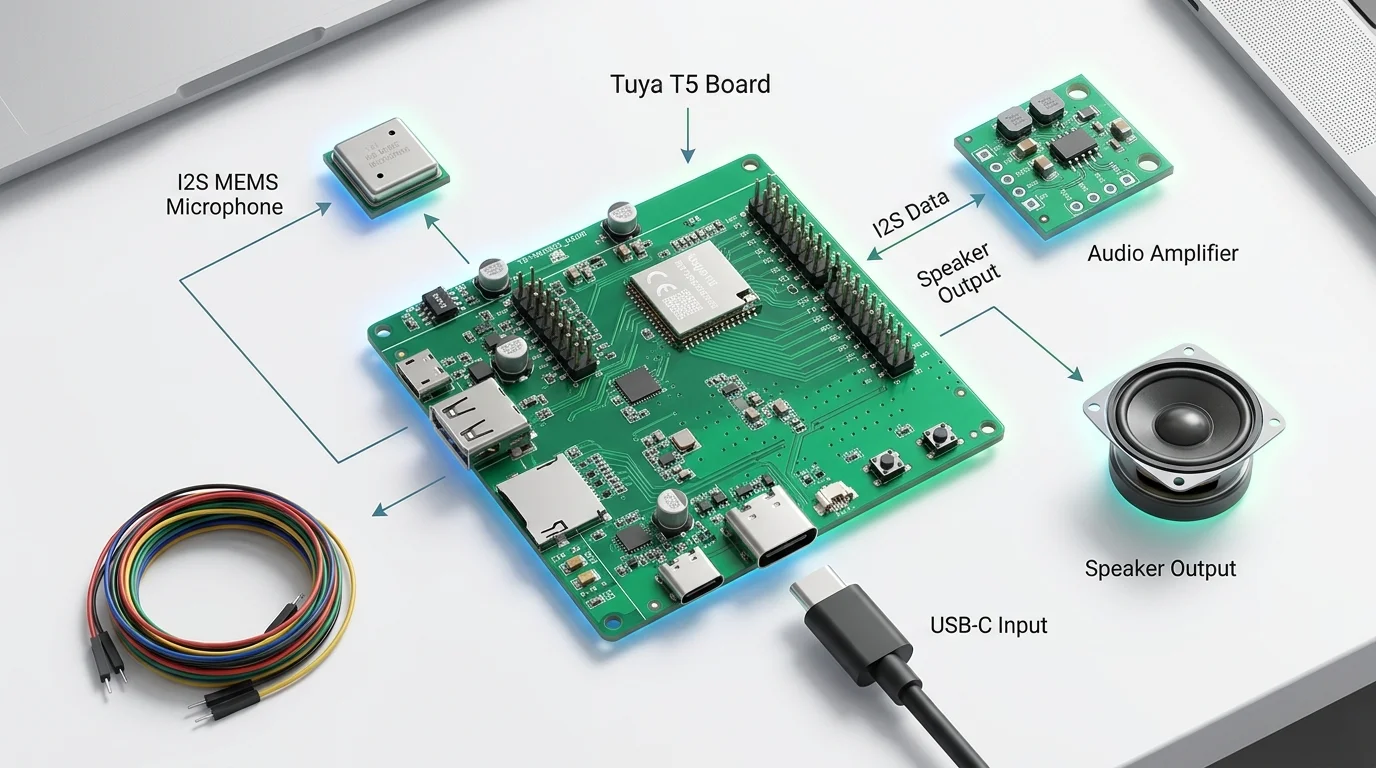
Want to skip the tutorial? The Tuya T5 dev kit ships pre-flashed with the TuyaOpen SDK, a microphone array, speaker amplifier, camera, and USB-C — plug it in and start building your voice assistant the same day it arrives. Order the dev kit here.
What Is an AI Voice Assistant (and How Does It Differ from a Smart Speaker)?
An AI voice assistant is software that accepts spoken input, interprets the user's intent using natural language processing, and responds — typically with spoken output or by triggering an action. The term covers everything from on-device keyword detectors ("Hey device, wake up") to full conversational agents powered by large language models.
The key distinction between a DIY AI voice assistant and a commercial smart speaker is not capability — it is architecture. A commercial product like Alexa or Google Home runs proprietary firmware on custom silicon with cloud-only inference. You cannot modify its behavior, swap its LLM, or inspect its source code. A TuyaOpen-based voice assistant, by contrast, gives you:
- LLM choice. Route conversations to DeepSeek, ChatGPT, Gemini, Qwen, or Doubao through a single API key. No vendor lock-in.
- Edge + cloud flexibility. Run keyword spotting and voice activity detection on-device; send only the actual speech segment to the cloud for ASR and LLM inference. This reduces latency, preserves bandwidth, and improves privacy.
- Full firmware control. Modify the audio pipeline, add custom wake words, integrate additional sensors, or deploy AI agents that can autonomously control IoT devices based on conversational context.
- Production path. The same SDK that powers your prototype also powers Tuya-certified modules shipping to millions of end users. There is no "rewrite for production" step.
For developers already working with Espressif's ESP32 family — one of the most popular MCU platforms in the TinyML ecosystem — TuyaOpen provides a direct upgrade path: the same voice assistant application code runs on ESP32 hardware through TuyaOpen's ESP32 support layer, giving you cloud AI, device management, and cross-platform portability on top of the ESP-IDF framework you already know. A voice assistant is the ideal project to explore this stack: it combines audio processing, Wi-Fi connectivity, cloud AI, and hardware control in a single application that demonstrates the full capability of the platform.
Already on ESP32? TuyaOpen runs on top of ESP-IDF — not as a replacement. Your existing ESP-IDF toolchain still works for low-level control via
tos.py idf. See the ESP32 on TuyaOpen overview for the full integration guide.
Hardware Requirements for a TuyaOpen Voice Assistant
The voice assistant pipeline has specific hardware requirements that go beyond a basic sensor-reading project. TuyaOpen's layered SDK abstracts the hardware differences, so your application code stays the same regardless of which board you choose. Here is what you need and why.
Microcontroller: Choosing Your Target Board
Voice processing involves multiple real-time stages — I2S audio capture, VAD, optional on-device KWS (keyword spotting), Wi-Fi networking, and audio decoding for TTS playback. TuyaOpen supports multiple hardware targets; here is how the main options compare.
| Chip | Clock | PSRAM | I2S | Wi-Fi | Best for |
|---|---|---|---|---|---|
| Tuya T5 | 480 MHz ARMv8-M | Integrated | Yes | Wi-Fi 6 + BT 5.4 LE | Production AI devices — purpose-built for agentic AI |
| ESP32-S3 (Espressif) | 240 MHz dual-core Xtensa | External (up to 16 MB) | Yes | 802.11 b/g/n | Existing ESP32 projects — add TuyaOpen on top of ESP-IDF |
| ESP32 (original) | 240 MHz dual-core | External (4–8 MB typical) | Yes | 802.11 b/g/n | Minimum viable — basic voice assistant |
The Tuya T5 is the strongest option for new projects because it was designed from the ground up for agentic AI on edge devices: 480 MHz ARMv8-M core with DSP and FPU, integrated Wi-Fi 6 and Bluetooth 5.4 LE, native camera and audio peripherals, and 22nm process technology that enables 16 μA deep-sleep current — critical for always-on voice assistants that need to listen for wake words without draining the battery. For teams already invested in the ESP32 ecosystem, TuyaOpen's ESP32 support means you can adopt TuyaOpen's cloud AI and device management capabilities without abandoning your existing hardware.
Not sure which board to pick? Read our detailed comparison: How to Choose the Right AI Development Board for Your Project.
Audio Input: Microphone
You need at least one MEMS microphone connected via I2S. For noisy environments (kitchens, factories), a dual-microphone array with beamforming dramatically improves speech recognition accuracy — research from Arm's Edge AI team shows that beamforming can improve ASR accuracy by 30–40% in reverberant environments. The Tuya T5 dev kit includes a built-in microphone array; for ESP32 boards, you will typically add an INMP441 or similar I2S MEMS microphone module.
Audio Output: Speaker
A MAX98357A I2S amplifier breakout driving a 3 W speaker is the standard choice for voice assistant projects. The amplifier converts digital I2S audio from the TTS output into analog signal for the speaker. For the Tuya T5, the on-chip audio DAC and amplifier support reduce external component count.
Wiring Summary
| Component | Interface | Notes |
|---|---|---|
| MEMS Microphone | I2S (input) | BCLK, WS, DATA pins |
| I2S Amplifier + Speaker | I2S (output) | BCLK, WS, DATA, GAIN |
| Wi-Fi | Antenna | Onboard for most dev boards |
| USB | UART/Debug | For flashing and serial monitoring |
Ready to build? Order the Tuya T5 dev kit — microphone, speaker, camera, and Wi-Fi 6 all pre-integrated. No wiring required.
Software Architecture: The TuyaOpen Voice Pipeline
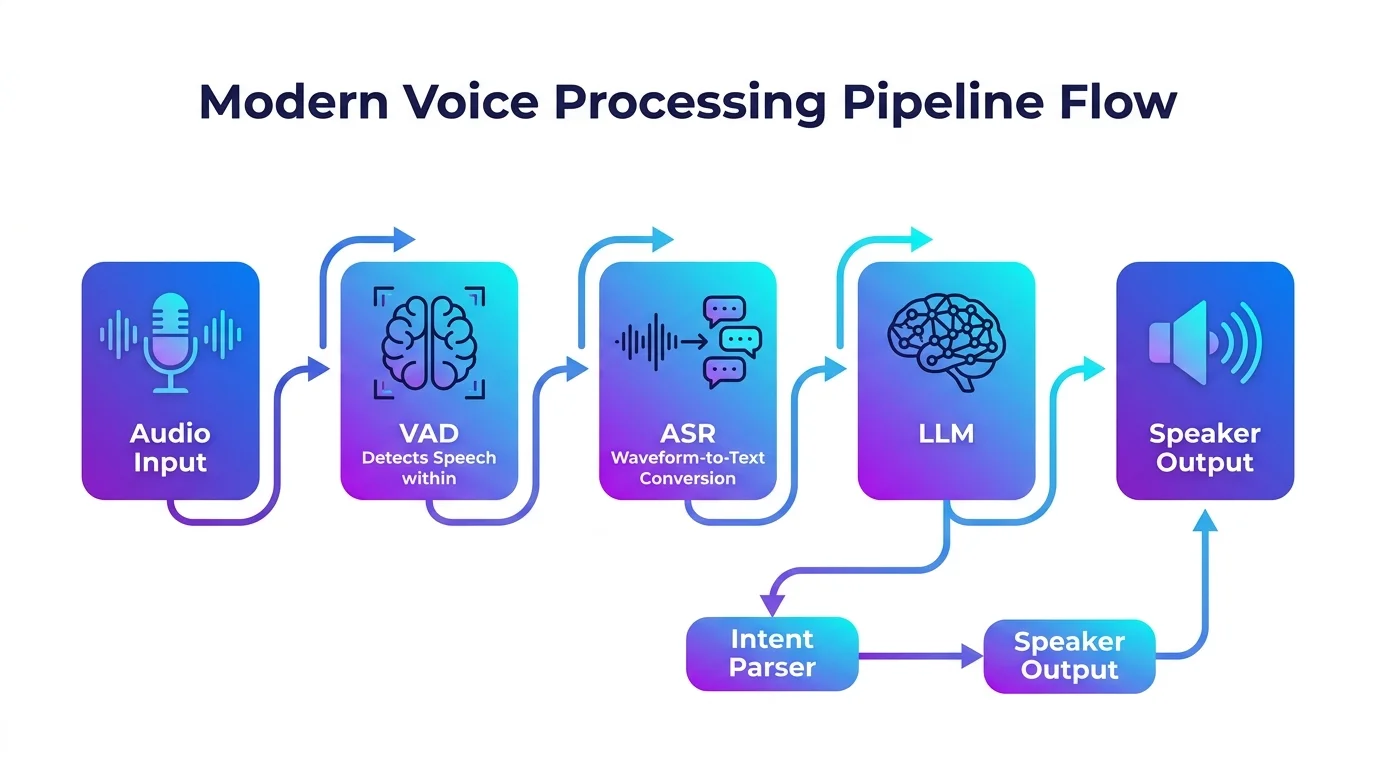
The TuyaOpen voice assistant follows a layered pipeline architecture. Understanding this pipeline is essential whether you are building on Tuya T5 or running TuyaOpen on ESP32, because the same logical stages apply — only the hardware abstraction layer changes. This is the core advantage of TuyaOpen's layered SDK architecture: TKL (hardware abstraction) and TAL (OS abstraction) let your application code remain identical across chips.
┌─────────────┐     ┌─────────┐     ┌──────────┐     ┌──────────┐     ┌──────────┐
│  Mic (I2S)  │────▶│   VAD   │────▶│   ASR    │────▶│   LLM    │────▶│   TTS    │
│  Audio In   │     │  Voice  │     │  Speech  │     │  Language │     │  Text-to │
│             │     │ Activity│     │  to Text │     │   Model   │     │   Speech │
└─────────────┘     └─────────┘     └──────────┘     └──────────┘     └──────────┘
                                        │                                    │
                                        ▼                                    ▼
                                  ┌──────────┐                         ┌──────────┐
                                  │  Intent  │                         │ Speaker  │
                                  │  Parser  │                         │  (I2S)   │
                                  └──────────┘                         └──────────┘
Stage 1: Audio Capture (I2S)
The I2S peripheral continuously samples the microphone at 16 kHz, 16-bit mono. TuyaOpen's audio HAL (Hardware Abstraction Layer) provides a unified API across all supported platforms — Tuya T5, ESP32, and others — so your application code does not change when you switch chips. On ESP32, TuyaOpen's TKL adapters (tkl_audio.c) translate these calls into ESP-IDF I2S driver functions automatically.
Stage 2: Voice Activity Detection (VAD)
VAD runs on-device and detects when a human is actually speaking versus background noise. This is critical for reducing unnecessary cloud API calls — the device only sends audio segments that contain speech. TuyaOpen includes a lightweight VAD model that runs in under 1 KB of RAM.
Stage 3: Automatic Speech Recognition (ASR)
Once VAD triggers, the audio segment is sent to Tuya Cloud's ASR service (or a cloud LLM with audio input capability). The result is a text transcription of the user's spoken query.
Stage 4: LLM Inference
The transcribed text is routed to your configured LLM backend. TuyaOpen's unified AI API means you configure your API key once and can switch between DeepSeek, ChatGPT, Gemini, Qwen, and Doubao without changing application code. For AI agent use cases, the LLM response can include tool calls — commands to control lights, read sensors, or trigger other IoT actions.
Stage 5: Text-to-Speech (TTS) and Playback
The LLM's text response is converted to speech via TTS and streamed back to the device for playback through the I2S amplifier and speaker. TuyaOpen handles the audio buffering and playback scheduling, so your application code simply receives the audio stream and writes it to the output peripheral.
Step-by-Step: Building Your First Voice Assistant
Here is the complete workflow from zero to a working AI voice assistant prototype. The same steps apply whether you are targeting Tuya T5 or running TuyaOpen on an ESP32 board.
Prerequisites
- A supported development board: Tuya T5 dev kit (recommended) or an ESP32 board (ESP32-S3 preferred) — see the ESP32 on TuyaOpen guide for compatibility details
- I2S microphone (INMP441 or similar) and I2S speaker (MAX98357A + 3 W speaker) — pre-integrated on the T5 dev kit
- USB-C cable for flashing
- A Tuya IoT Platform account (free tier available)
- An LLM API key (DeepSeek, OpenAI, or any supported provider)
Step 1: Set Up Your Development Environment
The fastest path is the TuyaOpen IDE — available as a VS Code and Cursor extension. It provides one-click toolchain setup, build, flash, and serial monitoring without manual configuration. If you prefer the command line, install the TuyaOpen SDK directly:
git clone https://github.com/tuya/TuyaOpen.git
cd TuyaOpen
. ./export.sh
tos.py check
Step 2: Configure the Voice Assistant Project
Navigate to the voice assistant example and configure it for your target board:
cd apps/tuya_cloud/voice_assistant
tos.py config choice
Select your target chip (Tuya T5 or ESP32-S3), then configure your Wi-Fi credentials and Tuya Cloud API keys in the generated configuration file. If you are targeting ESP32, TuyaOpen's build system will automatically layer on top of ESP-IDF — you do not need to manage the ESP-IDF toolchain separately.
Step 3: Wire the Hardware
Connect your I2S microphone and speaker to the appropriate GPIO pins. The TuyaOpen SDK includes pin mapping documentation for popular development boards. For the Tuya T5 dev kit, the microphone and speaker are already onboard — no wiring needed.
Step 4: Build and Flash
tos.py build
tos.py flash
The TuyaOpen build system handles cross-compilation, dependency resolution, and firmware packaging automatically. For ESP32 targets, it invokes the ESP-IDF toolchain under the hood via TuyaOpen's TKL adapters; for T5, it uses the Tuya-specific compiler. Your application code stays the same — this is the cross-platform promise of TuyaOpen's layered SDK in practice.
Step 5: Test the Voice Assistant
Open the serial monitor to watch the device boot:
tos.py monitor
Once connected to Wi-Fi, speak your wake word or press the button to activate listening. Ask a question — the device will capture your speech, send it to the cloud for ASR and LLM processing, and play back the spoken response through the speaker.
Beyond Basic Q&A: Adding AI Agent Capabilities
A voice assistant becomes significantly more powerful when it can take actions, not just answer questions. TuyaOpen's AI agent framework enables the LLM to call tools — functions that interact with the physical world. This aligns with the broader industry shift toward agentic AI — autonomous systems that reason, plan, and act — which McKinsey identifies as one of the most significant developments in applied artificial intelligence.
Consider a smart home voice hub scenario:
- "Turn off the living room lights." → The LLM recognizes the intent and calls the lighting control tool.
- "What's the temperature in the bedroom?" → The agent reads the sensor data and responds verbally.
- "Set an alarm for 7 AM and turn on the coffee machine." → The agent chains two tool calls and confirms both actions.
This is where the agentic AI paradigm shifts from a chatbot to a genuinely useful device. The TuyaOpen SDK provides pre-built tool definitions for common IoT operations (device control, scene activation, sensor reading), and you can define custom tools for your specific application. The DuckyClaw project demonstrates a native C SDK implementation of AI agents on microcontrollers — one of the earliest production-grade frameworks for deploying agentic AI to physical devices.
Go further with AI agents. The TuyaOpen AI Agent documentation shows how to define custom tools, chain multi-step actions, and deploy autonomous device control — all from your voice assistant.
For developers building open source AI for Arduino code, the same agent architecture is available through the Arduino-compatible API layer, making it accessible to the massive Arduino community while maintaining the production-grade reliability of the underlying C SDK.
Common Challenges and How TuyaOpen Solves Them
Building a voice-controlled IoT device involves several engineering challenges that TuyaOpen addresses at the framework level.
Audio Quality and Noise
Raw microphone input in real-world environments is noisy. TuyaOpen's audio pipeline includes 3A processing (AEC — Acoustic Echo Cancellation, AGC — Automatic Gain Control, and NS — Noise Suppression) to ensure clean speech capture even when the speaker is playing audio simultaneously. This is essential for a hands-free voice assistant that needs to hear wake words while its own speaker is active. The importance of audio front-end processing is well documented — see IEEE Signal Processing Society research on robust speech recognition in adverse conditions.
Latency
Users expect voice assistant responses within 1–2 seconds. According to Nielsen Norman Group's usability research, delays beyond 1 second cause users to lose sense of flow. TuyaOpen minimizes latency through streaming ASR (sending audio chunks as they are captured rather than waiting for the full utterance), optimized Wi-Fi throughput (especially with Wi-Fi 6 on Tuya T5), and efficient audio buffering.
Multi-Language Support
Tuya Cloud's ASR and TTS services support multiple languages out of the box. Combined with multilingual LLMs like GPT-4 and Qwen, your voice assistant can understand and respond in English, Chinese, Spanish, and other languages without code changes — just a configuration update. This aligns with the trend toward global AI accessibility highlighted by UNESCO's recommendations on AI ethics.
OTA Updates and Device Management
Once deployed, voice assistants in the field need firmware updates. TuyaOpen integrates with Tuya Cloud for secure OTA (Over-The-Air) updates, remote diagnostics, and device fleet management. This is the difference between a prototype that works on your desk and a product that works in thousands of homes — a gap that Gartner research identifies as the primary barrier to IoT commercialization.
From prototype to production. TuyaOpen's cloud integration gives you device activation, remote control, OTA, and data points out of the box — no custom cloud stack required. Start building with Tuya Cloud.
Use Cases: What Can You Build?
The voice assistant architecture described here is a foundation for a wide range of products. The global voice recognition market is projected to exceed $50 billion by 2030, driven by demand for hands-free interfaces in smart home, automotive, healthcare, and industrial applications.
| Use Case | Description | Key TuyaOpen Feature |
|---|---|---|
| Smart home voice hub | Control lights, appliances, and scenes by voice | AI agent tools + Tuya Cloud |
| AI companion gadget | Conversational toy or desk pet with personality | LLM integration + TTS |
| Accessibility device | Voice-controlled interface for users with limited mobility | ASR + custom tool actions |
| Industrial voice logger | Record and transcribe maintenance notes hands-free | VAD + cloud storage |
| Multilingual translator | Real-time speech translation for travel or education | Multi-language ASR + LLM |
| AI smart glasses | Wearable voice assistant with camera for visual Q&A | T5 camera + audio pipeline |
The Tuya T5 chip is particularly well-suited for the last use case — its integrated 1080p camera interface, audio processing, and Wi-Fi 6 connectivity enable multimodal AI applications that combine voice and vision in a single compact device. For teams exploring edge AI more broadly, Arm's Edge AI ecosystem provides complementary reference designs that pair well with TuyaOpen's software stack.
See the full hardware comparison. Not sure which board fits your use case? Read How to Choose the Right AI Development Board for Your Project for a detailed evaluation framework.
Next Steps
You now have a complete roadmap for building an AI voice assistant with TuyaOpen — whether you target the Tuya T5 or run TuyaOpen on ESP32. The key resources to continue your journey:
- TuyaOpen Quick Start — set up your development environment in minutes
- TuyaOpen IDE — AI-powered coding tool for firmware, cloud, and app development
- Tuya T5 Dev Kit — hardware with microphone, speaker, camera, and Wi-Fi 6 pre-integrated
- ESP32 on TuyaOpen — run TuyaOpen on your existing ESP32 hardware
- AI Agent Documentation — add tool-calling capabilities to your voice assistant
- TuyaOpen GitHub — source code, examples, and community
- Discord Community — connect with 1.3 million+ developers building on TuyaOpen
Start building today. Order the Tuya T5 dev kit and have your voice assistant prototype running this weekend — or clone TuyaOpen from GitHub and run it on your existing ESP32 board right now.
The voice assistant you build today is the starting point. As TuyaOpen's AI agent framework matures and multimodal models become more capable, the same firmware architecture will support increasingly sophisticated interactions — from simple Q&A to autonomous device control, contextual reasoning, and proactive assistance. The hardware is ready, the SDK is open source, and the ecosystem is active. The only thing missing is your project.